

Hybrid RSVP in Outlook: What It Does, What It Still Can’t Do


With hybrid working very much here to stay, Microsoft have risen to the challenge in how we now work by delivering us better way to handle In person meetings and hybrid RSVPs.
In this article we’re taking a look at the Hybrid RSVP response in Outlook that allows invitees to indicate how they plan to attend a meeting:
- Yes, in-person, OR
- Yes, on a remote call.
TL;DR?
The ‘Hybrid’ RSVP feature in Outlook address the challenges of co-ordinating & facilitating in-person meetings.
This article looks at the benefits and current shortcomings.
What is an Hybrid RSVP?
An RSVP (Respondez Sil Vous Plait) is a request to the recipient of an invitation to confirm whether they plan to attend or not.
Knowing this information allows the organiser to effectively plan a meeting or event, and the resources required to host it.
As many meetings and events can be attended virtually these days, the concept of a Hybrid RSVP (HRSVP) has been introduced so that attendees can indicate how they plan to attend: i.e, In-person or remotely.
In Outlook, the HRSVP request to recipients of a meeting invitation is triggered using the In-Person event (IPE) toggle.
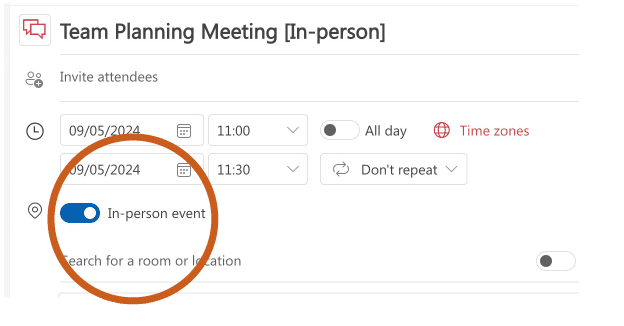
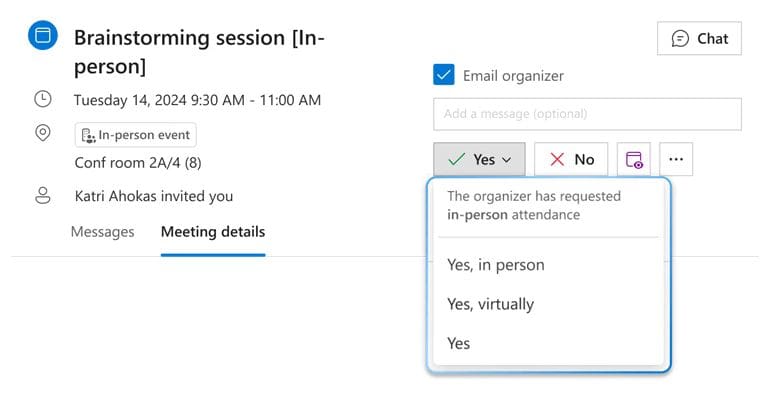
With the IPE toggle switched on, invitees are requested to indicate how they plan to attend when they say ‘yes’ to an event.

A key point to note here though, is that Hybrid RSVP is ONLY an option through the Outlook calendar; NOT the Teams calendar experience
Why is HRSVP so handy?
Here’s just 3 of the potential benefits of having the HRSVP feature in Outlook:
1. It helps avoid the negative impact of commute regret*
I for one have suffered the phenomenon of commute-regret. I turned up to a Teams meeting ‘in person’ thinking it would be a great opportunity to catch up with folk over a biscuit or three, only to realise that most people had opted to join remotely.
According to the urban dictionary, commute regret can go hand-in-hand with a ‘soul crushing’ effect that walking into an empty, ‘ghost town-like’ office has.
The fact is, both scenarios can be detrimental for organisations wishing to encourage their workforce into the office.
In theory, the IPE and HRSVP feature should help avoid such situations. By seeing who is attending in person vs remotely, you could conceivably:
- Stay at home when it looks like you’ll be a ‘Billy no mates’ if you come into the office.
- Come into the office to prevent FOMO and connect with your mates.
See point 3 for the end user experience using HRSVP.
*Commute-regret refers to the frustrating experience of commuting to the office only to find oneself alone and performing tasks that could have been accomplished remotely.
2. It avoids wasting precious resources, time & bacon butties. Probably….
Let’s say you have 20 people in your team and you want to organise a ‘hybrid meeting’.
With the HRSVP “piece of the jigsaw” in place you have a better chance of knowing who’s going to show up in person. So, for example, if 4 people say “yes, in-person” to a meeting and 15 say “yes, virtually”, you can:
- Book a meeting room that’s more space-efficient. For example, just 5 seats instead of 20.
- Avoid wasted coffee and bacon butties by over-ordering.
- Have a fully remote meeting and save the planet: less fuel, less heating, etc.
There are some gotchas with HRSVP as it stands currently, however:
As the organiser, you will need to do the maths on who’s going to attend in person, and change up any room reservations and catering orders accordingly to avoid waste.
You may have noticed from the above screen shot that invitees can still respond with a nebulous ‘Yes’, and not specify whether they’ll be attending in-person or virtually.
See more gotchas further on in this article.
3. It will be easier to meet in person.
Owl Labs’ 2025 State of Hybrid Work report, which surveyed 2,000 full-time UK workers, found that employees broadly understand and accept the reasoning behind bringing people into the office more regularly.
The majority see it as being about reinforcing culture, improving collaboration, and maintaining visibility, and they want those in-person moments to be meaningful, not something to tick a management box.
This exactly where commute-regret bites hardest. If someone travels into the office for a meeting and finds that most of the team has dialled in remotely, the trip is a frustrating waste of time and money. The frustration actively undermines the case for being in the office at all.
HRSVP addresses this by giving everyone, organisers and invitees alike, the information they need to make a sensible decision about whether the trip is worth making.
If attendance is going to be predominantly virtual, the organiser can restructure accordingly. From my own experience, if I see most of my team will be in the office, FOMO kicks in and I want to be there.
This only works, of course, if people actually use the feature. The nebulous “Yes” option is still available, which means the organiser’s tracking view can still be inconclusive. The feature rewards teams that have established a norm of using it consistently.
What HRSVP Can’t Do…Yet
While Hybrid RSVP is a useful step forward for the above-mentioned reasons, there are still some limitations to be aware of:
- HRSVP is not reliable if Work Hours & Locations not set: I noticed that the status of certain individuals comes up as ‘Not available’ in the Suggested times window, even when their diary is clear. I found this UX confusing. This is most likely owing to the fact that not everyone will have set their work hours and locations…we suggest you make this a priority – especially if you are thinking of rolling out Places.
- HRSVP doesn’t automatically flip location: In an ideal world, replying “HRSVP – Yes in person” would automatically update your location to be ‘Office’ if it’s not already set to this. This way, you’ll show up as available for other ‘in-person’ meetings on the same day. As far as we can see, it doesn’t do this. Whilst there may be good reasons not to do this automatically, it would be nice for end users to be given the option or a reminder to flip their status to ‘in office’ for a date on which they accept a meeting in-person.
- HRSVP doesn’t work with pooled workspaces: Let’s say you have a collaboration space that can accommodate up to 10 people. A manager can invite say, 5 team members to the workspace, however if any of those invitees declines the booking or says they’ll join remotely, 6 seats will still be taken out of the available pool!
Conclusion – In Person Events and Hybrid RSVP are great – but..
Understanding where your workforce is – i.e., working from home, or in the office – is important for many hybrid organisations:
- It helps businesses save costs and reduce their environmental impact
- It helps individuals and teams meet in person, with all the benefits of learning, efficiency, idea generation and wellbeing that offers.
- It also helps facilities teams optimise office accommodation and save costs
Microsoft’s In-Person Events setting and Hybrid RSVP are great steps in that direction as they give people a clearer signal of attendance intent and make planning in-person collaboration easier.
The good news is that Microsoft is continuing to invest heavily in this space through Microsoft Places, smarter workplace analytics, and Copilot-powered experiences.
For example, Copilot has the potential to make smarter room recommendations – for example, when you’ve booked a 20-person meeting room and only you and 2 others intend to be there in person.
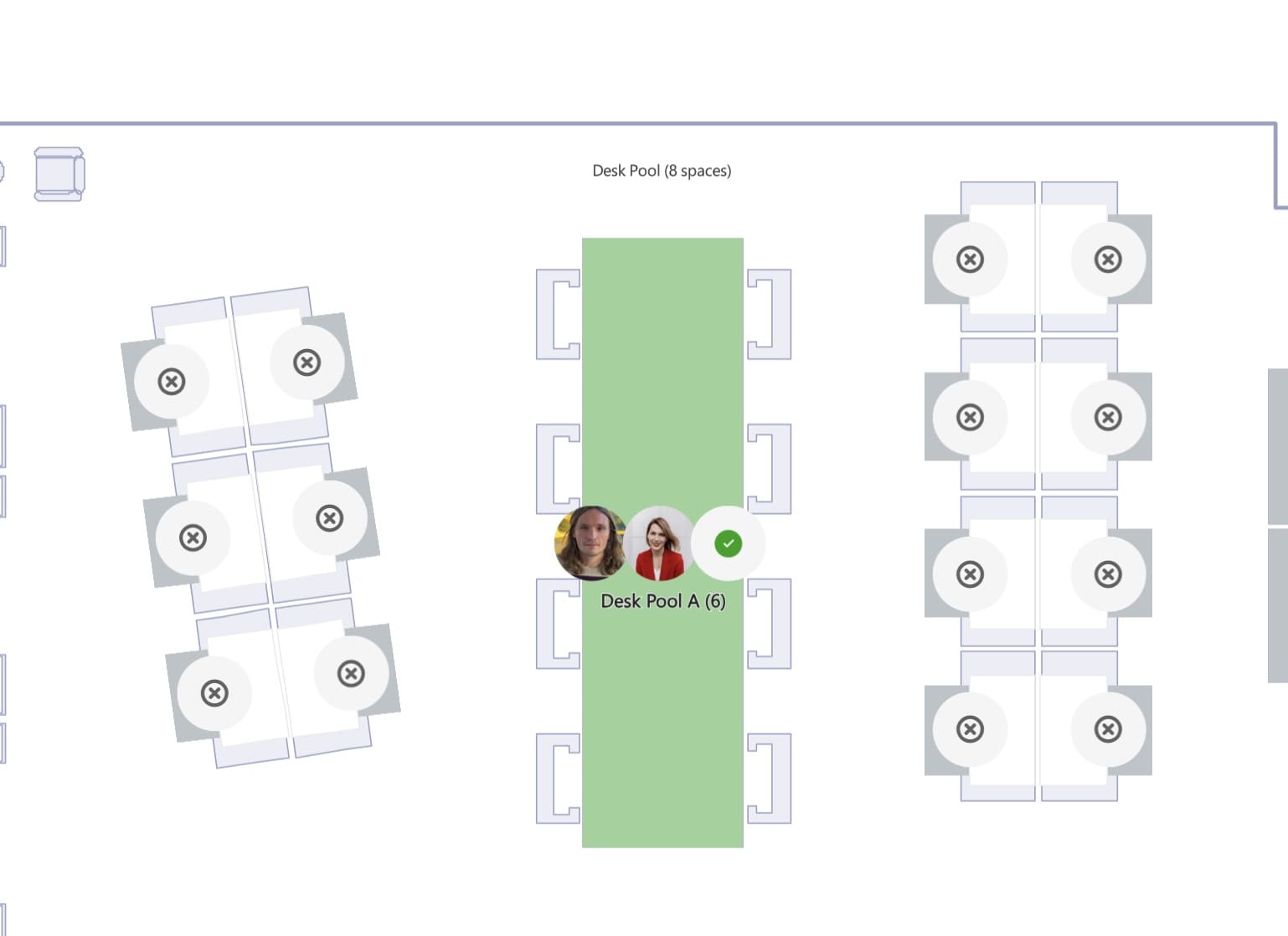
Additionally Microsoft Places is able to show where your co-workers are planning to be seated when they come into the office (via an interactive floor plan). This, again, makes it easier to work together when in the office.
As you might imagine, there are so many “moving parts” to the “who is where, when” story and not all of them can be addressed with technology.
For example, individuals may not want their whereabouts to be made known from a privacy stand point, whether using HRSVP or Places workplace presence and collaboration functionality.
There are also some gaps in native Microsoft functionality when it comes to optimising in-person office collaboration.
For example – we hear from facilities managers that they’d like to be able to quickly swap around room bookings to make them better suited to the team sizes that are using them. Also being able to better measure real attendance patterns is on the FM list… Watch this space for more information on these subjects.