EMAIL ARCHIVE MIGRATION
Future-proof your legacy email archives


Modernise your data without risking downtime or loss.
Overview
Fixed price email archive migration
Get a fixed-price for us to migrate your email archives quickly, securely & seamlessly.
By migrating your legacy on-premises or third-party cloud archives or journals to Microsoft 365 or Azure, you’ll get to reap many benefits such as reduced risk, anywhere accessibility and lower costs.
Ever mindful of the fact that budgets are always stretched, we can also empower your own IT team to complete your migration.

What our customers say

I'd like to thank you for all the hard work and professionalism over the last year or so - it has certainly been a colossal undertaking! I won't hesitate to recommend Essential for other projects in Capita.
Data Governance Solution Lead, Capita
BENEFITS
The benefits of our email archive migration service

Work with an experienced team
Essential has been helping enterprises migrate their email records from one platform to another for well over 20 years.
We know what it takes to get the best outcomes for everyone involved, getting quick results, zero downtime for users and full compliance for your legal department.
Get Advanced Controls
Our migrations offer sophisticated control and can cope with virtually any anomaly.
- Exclude what you don’t need, e.g., items > 7 years
- Merge archives belonging to the same person (common after a relocation or name change)
- Handle (& optionally re-write) different email addressing conventions
- Identify leavers, orphaned mailboxes, etc.

Secure, Compliant Archive Migration
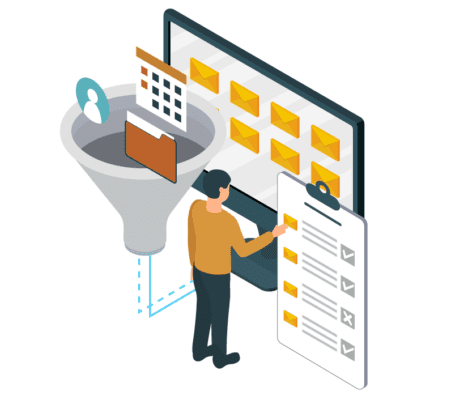
Our team, solutions and processes, will ensure a reliable and compliant migration.
- Detailed chain of custody reports account for each message
- Automatic failover, logging & task re-runs avoid data loss
- Critical metadata is preserved for legal teams (e.g., BCC’d recipients & DL members).
Schedule a chat & demo
FEATURES
What our email archive migrations deliver

100% Compliance
- Detailed chain-of-custody reports
- At a glance migration status updates
- Auto-retries of any failed items

Flexibility
We’ll profile what you have, and present options for dealing with different scenarios. We’ll also advise on and fit around your overall migration strategy, working hand-in-hand with your IT team.

Choice
Advanced filtering lets you easily select what gets migrated, where. E.g.
- Move selected departments/folders/users
- Move items > 2 years to archive mailboxes
- Exclude deleted items

Speed
High-speed connectors deliver optimum speeds without negative impact on your network or live email/archive services.

A great UX
Archives often use shortcuts in users’ mailboxes. As we migrate your archives we will check their current location and status, converting or removing shortcuts as needed.
This means no surprises ‘post migration’ that could have a negative impact on user productivity & UX.

A Great Track Record
Our archive migration technology is proven in over 2,500 migrations and is trusted by major vendors including Veritas and Microsoft.
We have also performed some of the largest email archive migrations in the world, including a project to move 3PBs.
FREQUENTLY ASKED QUESTIONS
FAQS
FAQ: What is email archive migration?
Email archive migration is the process of moving archived email data from one archive platform to another, or from an on-premises archive into a cloud-based service such as Microsoft 365.
Organisations often undertake email archive migrations as part of a wider digital transformation initiative, merger or acquisition, archive consolidation project, data centre exit, or to reduce the cost and complexity of maintaining legacy archive infrastructure.
A successful email archive migration should preserve the integrity of the archived data, maintain retention information and metadata, support compliance requirements, and provide a complete audit trail demonstrating that all required content was transferred successfully.
FAQ: Why migrate a legacy email archive?
Common reasons organisations migrate email archives include retiring legacy archive infrastructure, moving to Microsoft 365, reducing storage and licensing costs, supporting mergers, acquisitions and divestitures, improving compliance and eDiscovery capabilities, simplifying archive management, consolidating multiple archive platforms, and eliminating vendor lock-in.
For many organisations, email archive migration is not simply a technical project. It is an opportunity to modernise information governance, reduce operational costs and simplify long-term compliance management.
FAQ: How long does an email archive migration take?
The duration of an email archive migration depends on several factors, including the volume of archived data, the archive platform involved, network bandwidth, storage performance and the ingestion speed of the target system.
Smaller archives may be migrated in a matter of days, while large enterprise archives containing hundreds of millions of messages or multiple terabytes of data can take several weeks or months.
As part of any migration project, we typically conduct an assessment to establish likely throughput rates and create a realistic migration plan before any production data is moved.
FAQ: Can archived emails be migrated to Microsoft 365?
Absolutely. Migrating email archives into Microsoft 365 is one of the most common archive migration projects we undertake today.
Many organisations use email archive migration as an opportunity to retire legacy archive platforms, giving users access to all their email in one place, managing email retention and lifecycle policies through Microsoft Purview, and simplifying eDiscovery by having historical and current email stored within the same Microsoft 365 environment.
We can help you establish the best strategy for migrating your legacy email archives into Microsoft 365. For example, where users are still with the organisation, archived email can often be migrated directly into their Exchange Online Archive mailbox, allowing them to access historical emails natively through Outlook and Outlook on the Web.
Where individuals have left the organisation, archived email can be migrated into dedicated preservation mailboxes or other Microsoft 365 repositories, helping organisations retain access to historical content whilst meeting their compliance and retention requirements.
If you need to migrate archived email journals into Microsoft 365, there are several approaches available depending on your compliance, retention and eDiscovery requirements. You can learn more about the options available on our Email Journal Migration page.
FAQ: How do you preserve metadata during an email archive migration?
Preserving metadata is one of the most important aspects of any archive migration project.
Depending on the source archive platform, metadata may include retention information, sender and recipient details, folder structures, timestamps, message identifiers, legal hold information and journal archive data such as BCC recipients and expanded distribution lists.
Specialist archive migration tools and methodologies are used to ensure this information is extracted, validated and recreated correctly within the target environment, helping maintain compliance and eDiscovery capabilities.
FAQ: Can you migrate journal archives?
Yes. Journal archives can be migrated, but they require specialist handling.
Journal archives often contain compliance-related information that may not be visible within a standard mailbox archive, including BCC recipients, expanded distribution list membership and other envelope journaling information.
Because different archive vendors store this information differently, preserving journal data requires archive-specific expertise and migration tooling. This is particularly important where archived emails may later be used for legal discovery, regulatory investigations or compliance reporting.
FAQ: Can you selectively migrate an email archive?
Yes. In many cases, organisations do not need to migrate every archived email.
Depending on compliance requirements, it may be possible to migrate specific departments, business units, date ranges, archive stores, users or content types. Some organisations choose to migrate only recent data, whilst others use the migration as an opportunity to reduce archive storage costs and remove redundant content.
Selective migration can significantly reduce project duration, storage requirements and ongoing licensing costs.
FAQ: What email archive platforms do you support?
We support migrations from a wide range of legacy and modern email archive platforms, including Enterprise Vault, EMC SourceOne, EMC EmailXtender, OpenText IXOS, HP Integrated Archive Platform (IAP), HP RISS, Quest Archive Manager, Metalogix Archive Manager, Autonomy ZANTAZ EAS, NearPoint, Mimecast, Proofpoint, Microsoft Exchange Archives, Microsoft 365 Archives, PST Archives and Lotus Notes Archives.
If your archive platform is not listed, please contact us. We have experience migrating data from many proprietary, legacy and highly customised archive environments.
FAQ: How do you prove all archived emails were migrated successfully?
Enterprise archive migrations should provide complete auditing and reporting throughout the migration process.
This typically includes item-level tracking, migration logs, exception reporting and reconciliation processes that demonstrate which items were migrated, which items failed and how any issues were resolved.
For organisations with strict compliance requirements, maintaining a clear chain of custody and audit trail throughout the migration process is often a key project requirement.
FAQ: How do users access archives that have been migrated?
How users access migrated archived emails depends on both the source and destination archive platforms.
In archive environments that use shortcuts, stubs or links within users’ mailboxes to provide access to archived content, it is often possible to preserve a very similar user experience after migration. Where both the source and target archive platforms support shortcut-based access, migration tools can typically convert or recreate existing shortcuts so that they continue to work with the new archive.
Alternatively, many organisations use archive migration as an opportunity to modernise how users access historical emails. For example, when migrating to Microsoft 365, archived content can be moved directly into Exchange Online Archive mailboxes, allowing users to access historical emails natively through Outlook, Outlook on the Web and Microsoft 365 without relying on archive shortcuts or stubs.
The most appropriate approach depends on the source archive platform, the target environment and your long-term archive strategy. During the planning phase, we can advise on the available options and recommend the best user experience for your organisation.
Supported Platforms
RESOURCES
Resources on email archive migration
What our customers have to say about us
What our customers have to say
I’d like to thank you for all the hard work and professionalism over the last year or so – it has certainly been a colossal undertaking! I won’t hesitate to recommend Essential for other projects in Capita.
Data Governance Solution Lead, Capita

What our customers have to say
“Although shortcuts would still work across the network after migrating to Microsoft 365, the prospect of maintaining a dedicated email archive on-prem was a non-starter. Essential worked out the best strategy for migrating our archived emails into Exchange Online.”

Stephen Appleby, at An Post

What our customers have to say
“We did our research into migration methods, including manual extraction, which was deemed totally impractical. We had no issues and no surprises and achieved our objective to complete our migration earlier than scheduled.”
Enterprise Vault customer, financial organisation

What our customers have to say
“The migration approach certainly worked for us so we do not hesitate in recommending this approach to other organisations. We had no issues and no surprises and achieved our objective to migrate all archived email from EAS to the Exchange 2010 Online archive mailboxes. Essential delivered what was promised at the outset.”
IT manager, EAS migration to Office 365
[/vc_column_text][/vc_column][/vc_row]