Cross-Tenant GAL Synchronisation for Microsoft 365
Address list synchronisation for Microsoft enterprises


Keep everyone in touch in separate & security-conscious organisations
Overview
Keep your company & partner organisations in touch.
Mergers, distributed organisations, and security-conscious sectors such as defence and financial services often operate separate Microsoft Exchange environments.
This creates collaboration challenges, as contacts from different environments do not automatically appear in Outlook’s Global Address List (GAL).
Our GAL synchronisation solution bridges that gap, giving users seamless access to shared contact information without merging or connecting wider environments.

BENEFITS
The benefits of our storage migration service
Streamline communications across tenants
- Give staff in each domain the correct address details for contacting the relevant people
- Ensure distribution groups have the right people in them
- Trigger updates from multiple sources including HR & staff roster systems
- Each tenant keeps their own directory – there’s no loss of ownership
- Meet stringent security or compliance requirements.
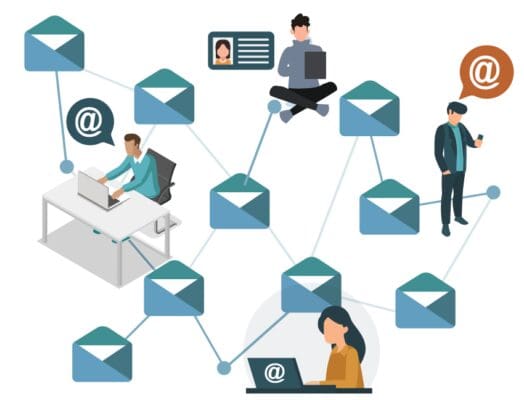

The IT pro’s favourite dirsync tool
It’s incredibly easy to configure and can save months of effort working with Microsoft Identity Manager (MIM).
Technical teams love it as it doesn’t become the main directory and doesn’t create a central, master directory.
It simply synchronises directory information, so there’s no issues over politics or security, or maintaining yet another directory!
Ease migrations & mergers
Address list synchronisation ensures people across different organisations can easily find and communicate with one another, even when systems, domains, or directories aren’t aligned.
- Support seamless co-existence during migration
- Maintain a common domain name following a takeover, merger or acquisition
- A Swap Proxy function lets the ‘outside world’ use your new corporate address, even though internal systems are still using the ‘old’ email addresses.

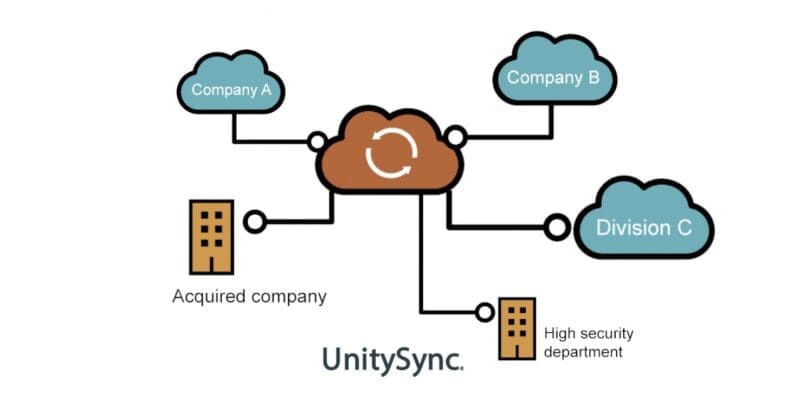
Supports many different data sources
- Any LDAP directoryCloud Directories: E.g., Azure Active Directory, Amazon (AWS), Google Workspace
- HRIS or ERP databases: E.g. PeopleSoft, Sage Group, Kronos, SAP, Oracle, ABRA, ADP
- On Premises: ADAM/AD LDS, Active Directory, CommuniGate Pro, iMail, Lotus Notes/Domino, OpenLDAP, Oracle Internet Directory, Red Hat Directory Server, Samba, SunONE/iPlanet Directory, ViewDS, Zimbra, etc.
- SQL: Microsoft Access, Microsoft SQL Server, MySQL, Oracle, Postgres, SQLite, Sybase & other databases that use ODBC drivers
- Text: CSV, LDIF, JSON.
- Other business systems such as a PABX system or company phone book.
What our customers say

The difference between this and the alternatives I’ve seen and used is that it makes the task of building a global directory very simple and straightforward...it didn’t disappoint.
Steve Goodman, MVP
FEATURES
What to look for in a GALsync solution

Easy to install & configure

Highly flexible

Meets even the most stringent security needs

Trust between domains not required

Support for many different directory types

No external database required
No scripting or programming required

Responsive & knowledgeable support
FAQ
UnitySync is typically used to synchronise directory and address list information between separate Microsoft 365, Exchange, and Active Directory environments.
Common use cases include:
- GAL (address list) synchronisation between separate tenants
- Mergers and acquisitions
- Divestitures
- Hybrid coexistence environments
UnitySync is designed for “keep tenants separate but connected” scenarios, helping organisations securely share selected directory information while maintaining separate environments.
UnitySync licensing varies depending on:
- User count
- Environment size
- Synchronisation requirements
More details are available here:
UnitySync provides a graphical interface for configuring:
- Synchronisation flows
- Attribute mapping
- Filtering
- Scheduling
See a demo here:
No. UnitySync is not a full migration platform. It does not migrate workloads such as SharePoint or Teams.
For full tenant-to-tenant migrations, organisations typically use tools such as:
- Quest Collaborate
- MigrationWiz
- Sharegate
UnitySync focuses on lightweight identity/contact sync and GAL coexistence, making it ideal for “keep tenants separate but connected” scenarios. As such, it offers a much lower price point.
Microsoft now provides cross-tenant collaboration and synchronisation capabilities through Microsoft Entra ID.
However, these features are primarily designed for identity and B2B collaboration scenarios rather than traditional GAL synchronisation and coexistence projects.
Many organisations still require more granular control over directory synchronisation, contact management and coexistence between separate Microsoft 365 or Exchange environments.
This is why dedicated solutions such as UnitySync continue to be used for mergers, acquisitions, divestitures and regulated environments where organisations need to keep tenants separate but connected.
Yes. UnitySync is well suited to high-security and regulated environments where organisations need collaboration between separate tenants or directories without fully merging them.
According to Essential’s article on secure directory synchronisation, UnitySync is commonly used in environments with strict security or data separation requirements, including:
- Financial services
- Defence
- Regulated organisations
- Divestitures and mergers
UnitySync securely synchronises selected information such as:
- GALs
- Contacts
- Free/busy visibility
while keeping environments separate and maintaining granular control over what data is shared.
Further reading: