Stop SharePoint Storage Spiralling Out of Control
Reduce Your SharePoint Storage Costs



Take control of versions, duplicates and retention – and reduce your storage costs.
Overview
Why SharePoint storage* gets out of control
Your SharePoint storage isn’t growing because of files – it’s growing because of how those files are managed:
- Hundreds of versions of the same document
- Large files duplicated across Teams and sites
- Retention policies preserving everything by default
Over time, what looks like a manageable dataset turns into hundreds of TBs and big bills for Microsoft overage.
The challenge isn’t just storage. It’s lack of control over how that storage grows.
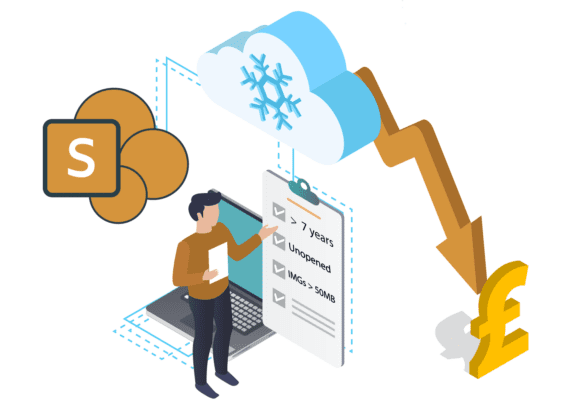
*Bear in mind that SharePoint storage includes OneDrive, Teams and Groups – as all files are stored in SharePoint Online behind the scenes.
What our customers say

By archiving 200TB of SharePoint data to Azure Blob storage, we reduced our storage costs by around 70%. Granular archiving rules gave us control across different geographies, while users had seamless access to the files they needed.
IT leadership team, global drinks manufacturer
THE SOLUTION
Take Control of SharePoint Growth.
Shrinking SharePoint storage needs a balanced, 4-step approach:
- Profile your data
- Control version growth to stop unnecessary storage consumption
- Identify and clean up common offenders like duplicate large files
- Archive intelligently where retention or access requirements mean deletion isn’t appropriate.

1. Profile Your SharePoint Data
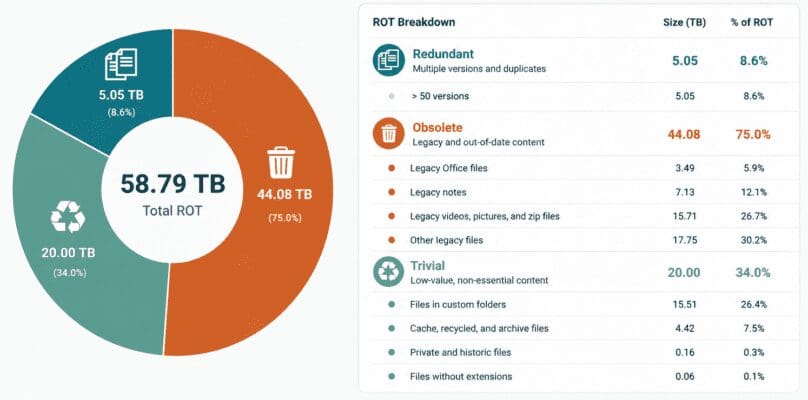
Native Microsoft 365 tools provide high-level usage data, but limited insight into the causes. Identifying ROT (redundant, obsolete and trivial data), duplicate files, or version sprawl typically requires manual effort, scripting, or guesswork.
Use our tools to get clear visibility into your storage, identifying ROT, surfacing duplicates, and understanding exactly what’s consuming space across SharePoint, Teams and OneDrive.
This is your first step to seeing what’s driving your storage increase – and where to take action first.
2. Get Immediate Storage Savings with Version Management
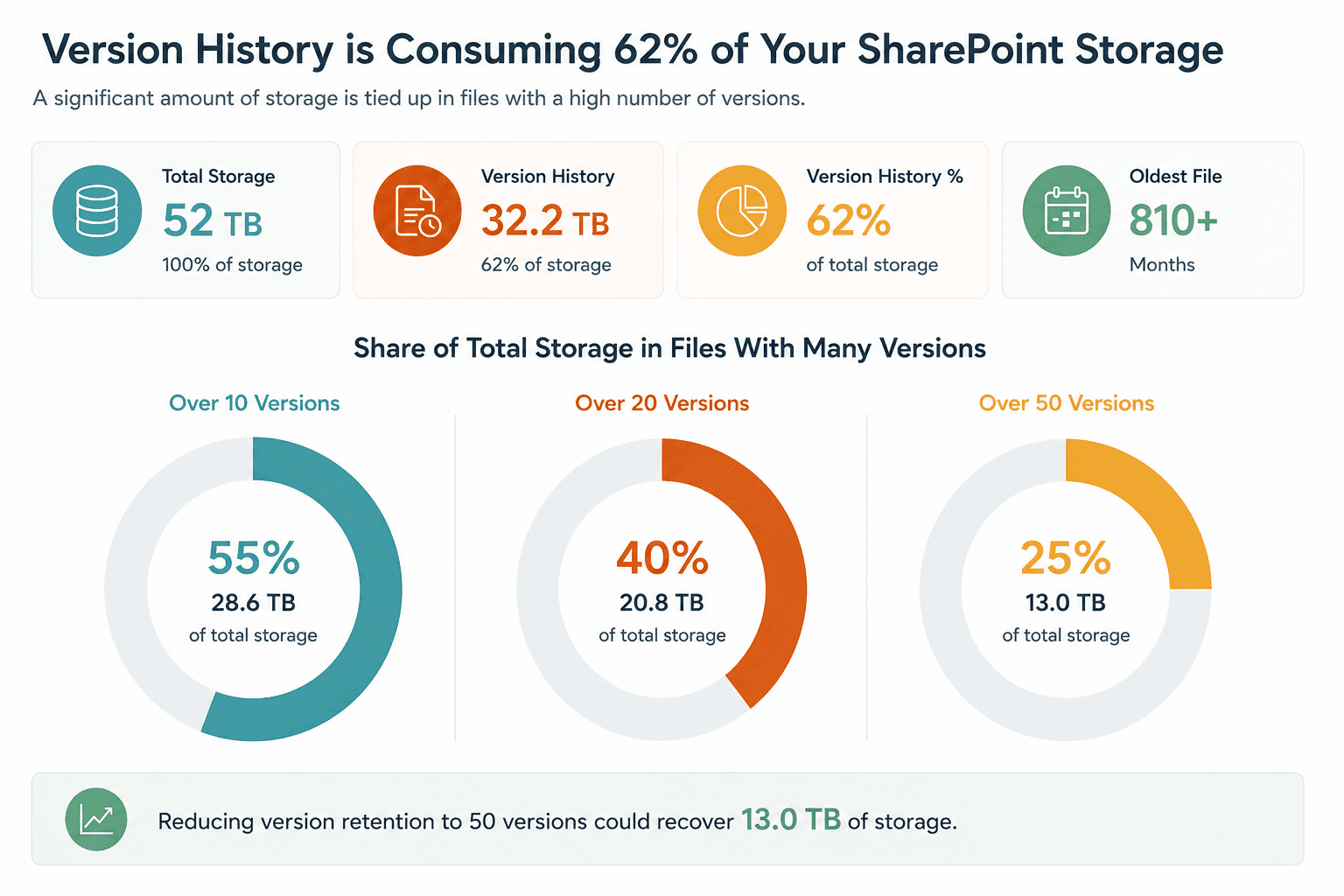
Left unmanaged, versioning quickly becomes one of the biggest drivers of storage growth.
Manual scripting lets you identify and trim excess versions, however, doing this at scale – safely, consistently, and with clear visibility – is where things get complicated.
Our tools will help you:
- Project the impact of implementing new version limits (i.e., model ‘What If’ scenarios)
- Reclaim storage quickly & safely after a version clean-up
- Apply & automatically maintain sensible version limits across your environment.
The result is faster, more controlled storage reduction – without the risk and manual overhead of doing it all yourself.
What our customers say

We rolled out automated versioning across all our SharePoint sites before Christmas to see what impact it would have on storage. It was far more successful than expected, reducing our overage costs by two-thirds. IT project manager, UK charity
IT project manager, UK charity
3. Control Duplicate Files Across SharePoint, Teams & OneDrive
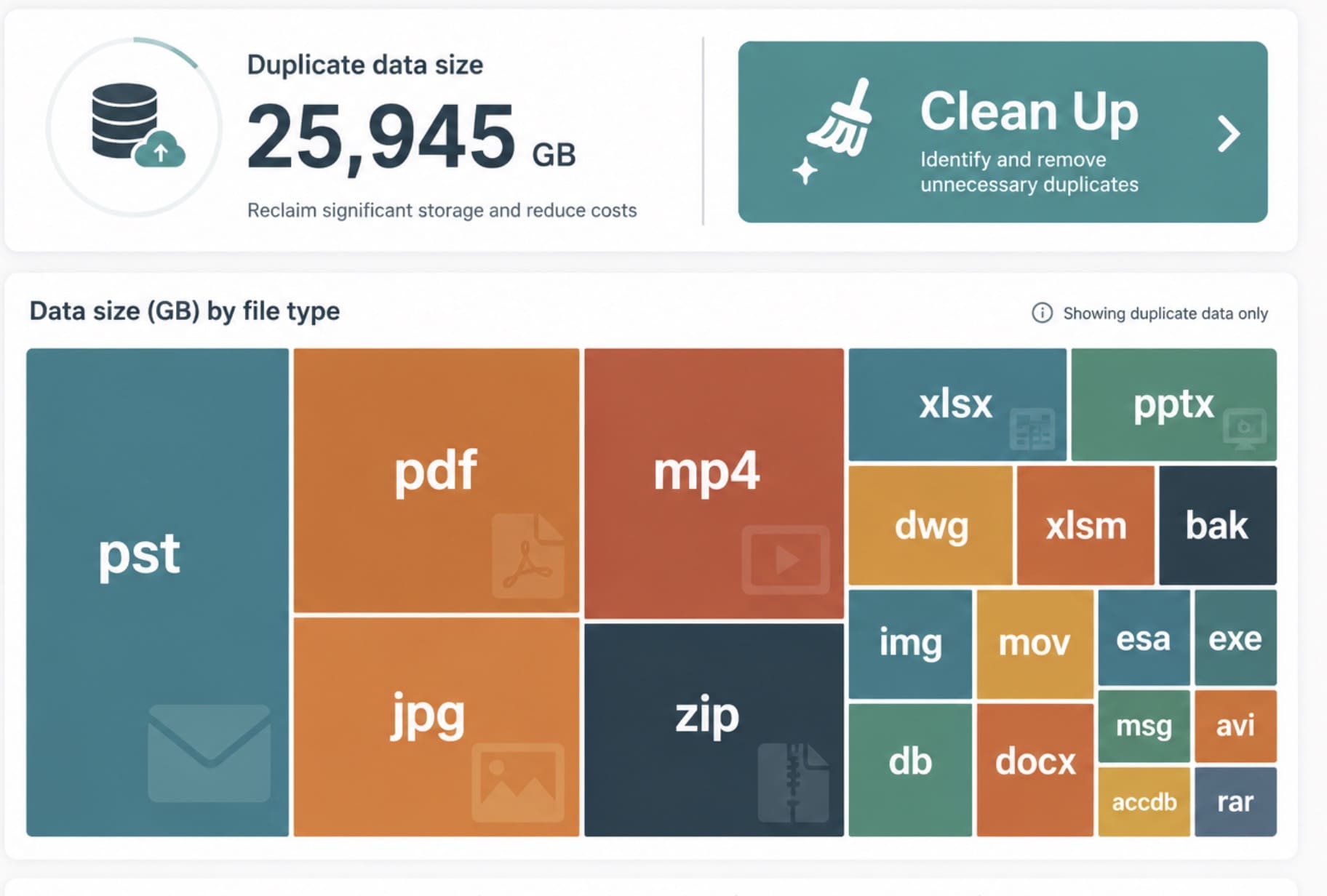
The same large files are frequently copied across Teams, sites and user workspaces, often with full version history attached to each copy.
Now you can:
- Target large files like PSTs, videos, DWGs and presentations
- Delete or archive (see point 3) unnecessary copies safely.
This is often one of the fastest ways to reclaim large amounts of storage – especially in Teams-heavy environments.
4. Archive SharePoint Where Needed
Version management may help avoid overage charges in the short term – but it’s rarely a long-term fix, as storage will always continue to grow.
Your anticipated storage savings through version management may also be limited by retention policies, which can prevent older versions from being removed.
And, bearing in mind that users may still need occasional access to really old files, wholesale deletion of older versions may be not be practical.
In these cases, instead of keeping everything in expensive SharePoint storage, you can move older versions or inactive content to lower-cost storage, without risking the loss of files users and your business still rely on.

Get a management summary of how much you could be saving
FAQ
In most environments, SharePoint storage growth is not caused by new files alone. It is often driven by how content accumulates over time.
- Version sprawl: files with hundreds of historical versions.
- Large files: videos, PSTs, CAD files and large presentations multiplying with each version.
- Duplicate content: copies of the same files across Teams, SharePoint sites and OneDrive.
- Retention policies: preserving content and versions even after limits are changed.
Understanding what is driving the growth is the first step to reducing SharePoint storage costs effectively.
Yes. Version history is often one of the biggest contributors to SharePoint storage growth.
You can use native PowerShell and PnP tools to identify and trim excess versions, but doing this safely at scale can be complex and time-consuming.
Our approach helps you:
- Identify files and libraries with excessive version history.
- Apply sensible version limits moving forward.
- Reclaim storage quickly after a version clean-up.
- Maintain better control over version growth long term.
Yes. Duplicate files and large content types are often major contributors to SharePoint storage consumption.
Common offenders include PSTs, videos, design files, large presentations and exports that have been copied across multiple Teams or sites.
We can help you identify these high-impact files and apply the right action, whether that means removing duplicates, reducing unnecessary versions, or archiving content that no longer needs to sit in premium SharePoint storage.
Yes. AvePoint Opus allows you to combine version management with archiving to reduce storage without losing control.
You can define how many versions to retain, for example keeping only the latest version and a set number of previous versions, while archiving older or inactive content where appropriate.
This gives you flexibility to balance storage reduction with business, user access and compliance requirements.
Yes. AvePoint Opus provides a high level of flexibility when it comes to archiving rules and policies.
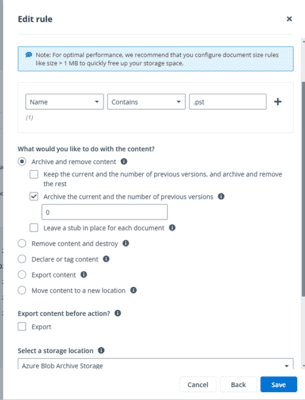
Policies can be based on age, size, location, document type, activity and number of versions. Rules can be applied across an entire SharePoint site, a single folder, or at document level.
Multiple rules can be applied, allowing you to tailor policies for different sites, departments, business units or content types.
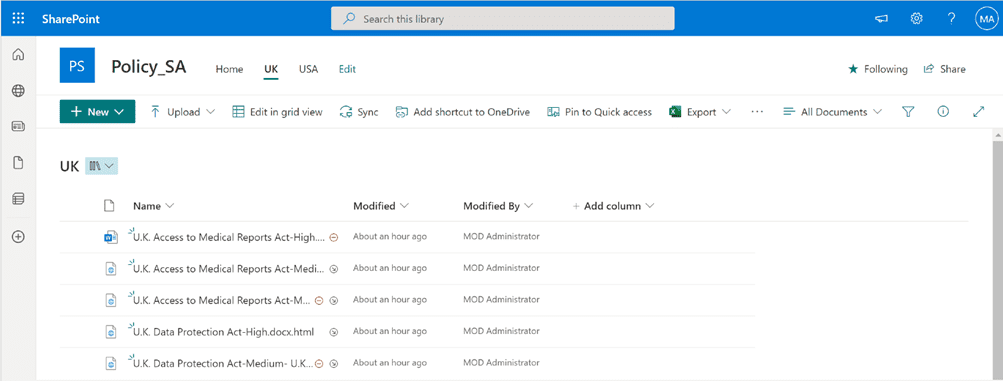
Yes. The process can be made transparent to end users, allowing them to restore archived items themselves without needing to involve IT.
The user experience is based on shortcuts or stubs, which act as placeholders for archived items. The content appears to remain where users expect it to be, but the full file is stored in lower-cost archive storage.
When a user opens an archived item, they are directed to ReCenter, where the file can be restored back to SharePoint, either in place or to an alternative location if that option is enabled.
The on-screen status bar shows the restore progress and confirms once complete. The shortcut then changes back into the original document icon.
No need to involve IT at all.
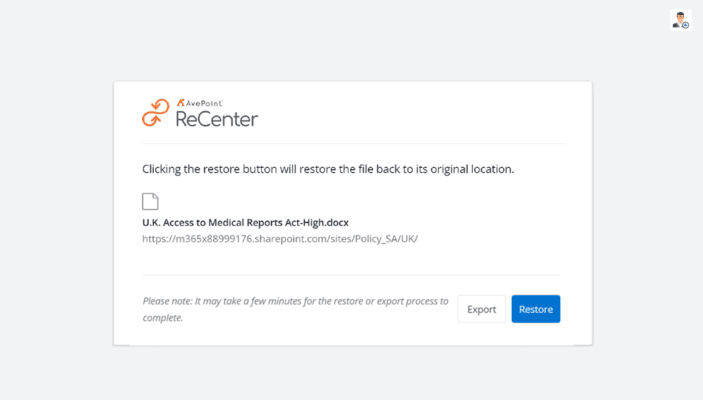
Yes. Both admins and end users can search archived content and choose to restore or export data, depending on the permissions and options you configure.
Admins have additional restoration capabilities, but by giving end users access to a restore portal such as ReCenter, you can reduce the load on IT and helpdesk teams.
AvePoint Opus maintains permissions on documents and SharePoint site collections.
End users using ReCenter will only be able to view and restore files they already have permission to access.
If you need deeper visibility into permissions across documents, sites and more, AvePoint also offers an Insights module.
It depends on your requirements. AvePoint offers a fully hosted solution, where you choose the datacentre location, or you can use Bring Your Own Storage, which allows you to keep archived content in storage you control.
We have customers using both approaches, and the right option usually depends on your organisation’s priorities around cost, control, data sovereignty and operational simplicity.
If keeping data in your own tenant is the priority, Bring Your Own Storage may be the better fit, although you will also need to consider Azure or Amazon transaction fees.
If you prefer a single predictable cost for SharePoint archiving, the vendor-hosted option may be more suitable.
Essential can help you decide which approach is right for your environment.
Yes. We recommend and deploy AvePoint Opus because it gives organisations a high level of control over where archived data is stored and managed.
When using Bring Your Own Storage with AvePoint Opus, customer data generally remains within the storage location you provide and control.
There are some important points to be aware of:
- Metadata and API call data: AvePoint Opus interacts with your tenant using Microsoft Graph API and other required endpoints.
- Data storage: Core files and documents remain in the storage location you configure.
- Temporary processing: Small amounts of metadata may be temporarily cached as part of the service operation.
- Data residency: AvePoint designs its solutions to support data residency requirements.
When configuring Opus, the Essential team will work with you to determine the right tenant location for application settings, metadata, file properties and permissions.
Additional security measures can also be considered, such as Azure BYOK (Bring Your Own Key), where required.
No, you are not limited to Microsoft Azure. AvePoint Opus can be configured to work with different storage containers.
Microsoft Azure Blob Storage is the most common option, but alternatives such as Amazon S3, Dropbox, FTP and SFTP may also be supported depending on your requirements.
The amount of management required depends on your organisation’s use cases, the level of automation configured during implementation, and your ongoing business needs.
Once set up, periodic reviews may be needed to ensure the system remains aligned with organisational policies, compliance standards and storage goals.
- Version and archive policies: Review limits and rules as usage changes.
- Retention requirements: Ensure archiving activity continues to align with compliance needs.
- Access controls: Review permissions periodically to maintain least-privilege access.
- Automation workflows: Fine-tune workflows based on user feedback or operational changes.
Essential can lead this on a quarterly basis as part of our supporting service.
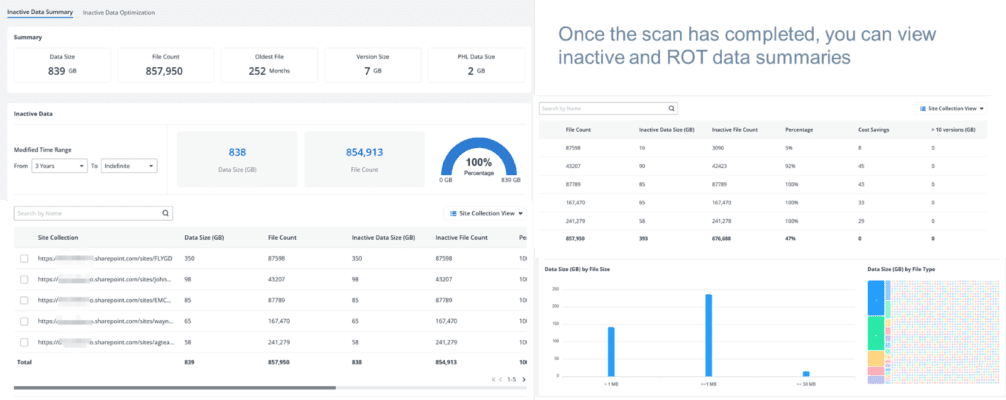
Storage savings are typically achieved through a combination of version management, duplicate reduction and targeted archiving.
Our specialist team can show you how much storage is being consumed by version history, large files and inactive data, and model the potential savings from addressing each area.

There are no strings attached. If it is not the right fit, we will uninstall and be on our way.
Want to know more? Get in touch for a chat with a specialist, see a demo or organise a trial to see for yourself. You can also check out our free online storage saving calculator .
Schedule a chat & demo
What our customers have to say about us

What our customers have to say
Essential were supportive during the implementation phased and helped us with our design, integrations, and communications. I’ve been impressed with how seriously they take our comments and seen vast improvement to the system in the three years I’ve used it.
Harriet Smith, Digital Learning Producer at Historic England
What our customers have to say
The service we’ve received from Essential has been nothing short of impeccable. The team are always on hand to answer our questions, response times are usually less than a day.
Harriet Smith, Digital Learning Producer at Historic England

What our customers have to say
News and the Social Media features are a big hit. For the first time we can connect all our employees with the work we do in the diabetes community. Our intranet enables our employees to directly experience the value and impact their work has on the community we serve.
Sr. SharePoint Administrator, Health Organisation

What our customers have to say
“Love the simplicity of the service’s UI – setup took less than 30 minutes, and it just works. This is one of the simplest ways for us to achieve our offsite backup requirements. I can sleep well, knowing there’s an immutable copy of our VMs on Azure storage.”