




Finding Free Copilot Training Resources Is Easy. Driving Copilot Adoption Is the Real Challenge.


If you search the internet for free Copilot training, you’ll find a big range of excellent resources that are available at zero cost.
Microsoft provides great learning content, there are countless YouTube videos, webinars, blogs and prompt libraries, and many technology partners offering free introductory courses.
Share a few links with your workforce through email, Teams or SharePoint and you’re done – right? Well, probably not. There’s an old saying: You can take a horse to water, but you can’t make it drink.

The same principle applies to training.
You can make training available. You can promote the hell out of it and put it in development plans.
But actually getting employees to engage with training, understand how it applies to their role and start putting what they learn into action, is something else again.
In other words, just because Copilot training is readily and freely available doesn’t mean employees will take any of it onboard, retain it or put it into practice. For even more info on how to make the most of your Copilot, check out our article here.
Why Free Copilot Training Often Falls Short
So, to re-iterate, when it comes to learning about Copilot, the problem isn’t laying your hands on great content. The problem is in enabling employees to find it, matching it to their needs and encouraging them to consume it ‘under their own steam’.
To help people find training, you can promote relevant courses in related Microsoft Teams channels, embed learning resources in SharePoint sites, include learning recommendations in employee communications and create dedicated hubs where users can access support, prompts and guidance.
Some organisations even allocate AI champions and targeted campaigns to highlight specific use cases and success stories across the business.
The challenge is that people in today’s workplace are already drowning in information, and finding the time to learn something new can feel impossible.
Between emails, meetings, chats, tasks and notifications, even highly motivated employees can struggle to find – and find the time to engage with – ‘optional’ learning content.

Additionally, line managers and learning and development teams have little to no visibility of what learning is being carried out.
The result? Copilot learning becomes ‘hit and miss’, with some employees becoming power users while many others never move beyond basic usage and fail to realise its full potential.
In some cases, the challenge goes deeper than training. If employees aren’t given clear guidance on why your organisation is investing in AI, they may be hesitant to embrace it. Positioning Copilot as a tool that helps people work smarter – not a replacement for people – is often just as important as the training itself.
How Structured Learning Can Maximise Your Copilot ROI
Instead of sending employees a collection of links to Copilot training resources and hoping for the best, the organisations seeing the greatest success with Copilot are combining learning content with structured learning journeys.
A structured approach helps ensure training is:
- Tailored to different roles. Rather than relying on generic AI training, training that’s targeted and relevant to people’s role will give you the best chance of getting people productive. In our experience, it only takes one ‘juicy worm’ with AI to get people totally hooked on what they can achieve with it! Examples include e.g. Excel AI training for sales and finance-related roles.
- Part of a learning pathway. Instead of overwhelming people with a whole slew of Copilot learning, taking a gentle route that includes introductions and small examples, broken down into bite-sized chunks that are easy to consume and in an logical flow makes for a better learning experience.

- Suited to novices and AI high-flyers. By matching the level of learning to the capabilities of the audience, you’ll avoid frightening off beginners or, indeed, boring advanced learners.
- Tracked and measured. Understanding who’s making progress and who’s yet to get off the ground with Copilot training is a powerful tool, enabling managers to support individuals where needed and be able to report back to the business on Copilot training status.
- Reinforced with quizzes and assessments. Without checks that prove learners actually understand what they’ve just read or seen, they could just ‘whizz through training’ without really getting value from it.
- Top of mind. It’s easy for folk to get excited about AI and then forget as day-to-day tasks take over. Structured learning delivery usually goes hand-in-hand with progress tracking and gentle reminders and features that encourage engagement, including certification and what they call ‘gamification’ where people can compete with co-workers for learning completion. This facility is essential where enterprises need to update people on new AI features, or indeed highlight ‘how not to use AI’ examples.
- Underpinned by acceptable usage policies and positioning. An essential part of AI training is understanding why and how it is being used, and the pitfalls to avoid. (such as believing everything it says, or sharing IP with platforms outside of Copilot such as ChatGPT and Claude).
The result is a learning experience that is builds confidence, encourages faster adoption and helps employees apply Copilot effectively in their day-to-day work, whilst ensuring your enterprise gets the most out of its investment.
On the subject or ROI, check out this next cost-saving advantage that structured learning can offer.
The Cost Saving Benefit of Adding Structure into Copilot Learning
Another benefit of adding structure to the Copilot learning journey is that you have the potential to link Copilot licence allocation to successful completion of your ‘Copilot Essentials’.
A typical structured Copilot learning journey might look like this:
- Assign ‘foundation-level’ Copilot training and quizzes (tailored on a per group or individual basis)
- Encourage users to carry out some simple AI tasks (ideally for which a Copilot licence isn’t needed*)
- Ask employees to review and acknowledge your company policies. I.e., what constitutes acceptable usage
- Once – and only once – these steps are successfully completed, allocate a Copilot licence.
Let’s face it: Copilot licences aren’t cheap, so this approach means you’re spending your money on users who are ready to get value from Copilot (as well as avoiding the risk of AI misuse – examples of which are plentiful on the internet!).
You might also use other AI platforms that consume ‘points’, in which case you’ll want to ensure individuals know how to create the best possible prompts before pressing GO on an AI creation.
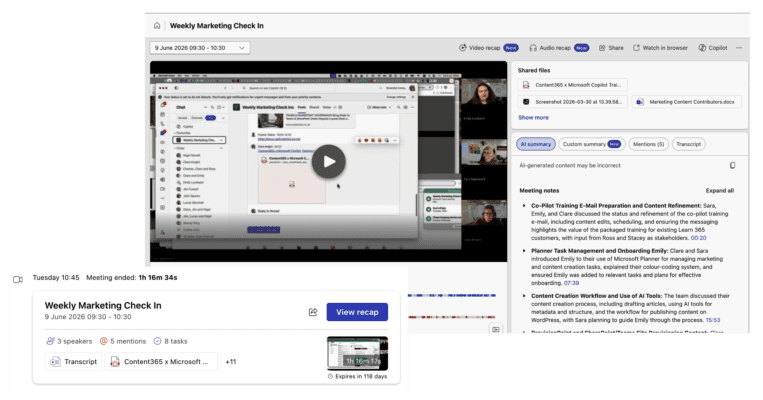
*A great example of this is Intelligent Recap in Microsoft Teams. You don’t need a full Copilot licence to access this service (just Teams Premium) and the ability to turn lots of pre-meetingbanter, umms, ahhs and general chat back and forth into pithy meeting notes, tasks and action items is a game changer. This is useful for most roles.
The Bottom Line
Free Copilot training is valuable. But if your goal is meaningful adoption, improved productivity and measurable ROI, simply providing access to content isn’t enough.
The organisations seeing the greatest success with Microsoft Copilot are the ones combining training with structured delivery, learning pathways, acceptable usage policies, adoption monitoring and, indeed, licencing.