





Are you getting value for money out of Copilot?


If you’re investing in Microsoft Copilot – you’re probably asking the same thing we hear from nearly every organisation: ‘How do we get a decent return on our AI investment?‘
It’s not cheap – at over £21 per user per month.
Also, when compared with platforms like ChatGPT, it’s arguably a little ‘behind the curve’, but there are some compelling arguments for rolling it out for Microsoft 365 enterprises:
- It’s evolving and improving all the time. Check out the new Copilot features that were added this last July.
- Tight Copilot integration with Microsoft applications equates to big time savings. For example, Teams meeting summaries save me hours each week.
- Not offering an enterprise AI tool could lead to your workforce using external AI platforms such as ChatGPT, which could compromise your data security and intellectual property – especially if users have the ‘improve the model for everyone’ switch set to ‘on’
- You can train Copilot outputs to be more specific to your business.
- Copilot is less prone to hallucinations!
But what if you’re rolling out Copilot and the expected productivity boost you were expecting isn’t happening. Perhaps you have a handful of AI enthusiasts that are really getting to grips with it all, meanwhile you’ve many others that are sticking to old habits or aren’t confident enough to make AI part of their day-to-day routine.
Here’s my 6 tips to getting better value out of your Copilot investment:
6 Solid Ways to Get Better Value out of Copilot
1. Only give Copilot licences to those that have successfully completed training.
Why waste Copilot licences on untrained users? This may sounds a bit harsh, but would you give a high-performance car to someone that can’t drive?
My tip is to create a Copilot learning academy and only let people that have completed your training have a Copilot licence.
Although (sadly) you can’t get a free 30-day Copilot trial to use while you’re learning, users with an eligible Microsoft 365 subscription can use ‘play with’ Copilot Chat at no cost.
Copilot Chat is a good starting point for those new to AI and will help demonstrate some neat prompts, such as
‘Show me my top 5 priorities’.
This prompt is something I use a lot to keep me on track with what I need to do next – and it uses content from my Teams meetings, planning documents and Planner Tasks to generate the list.
Once users have completed their training – and acknowledged your organisation’s AI Acceptable Use Policy (see my next point) – you can confidently begin allocating Copilot licences to those who are ready to get the most value from them.
2. Mandate an AI Acceptable Use Policy and Get Formal Sign-Off
Having clear guidelines on how people should – and shouldn’t – use AI within your organisation is essential for realising its benefits without introducing risk to your business or concern amongst your workforce.
An AI Acceptable Use Policy should cover approved tools, data privacy, intellectual property, customer-facing content, output review, transparency, and ethical use.
For example: yes, use Copilot to help summarise a meeting, rework marketing copy, draft a proposal structure, or create generic icons for a customer report, but don’t pass it off as entirely your own handiwork.
The Deloitte incident earlier this year, where a paid-for report contained AI-generated errors, is a useful reminder that AI output still needs human review, fact-checking, and accountability.
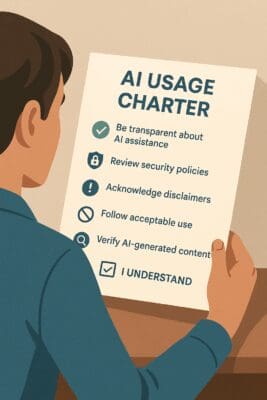
PS – Full disclosure – I used ChatGPT to create this pic!
Ensuring AI safety is essential – such as use only business-approved AI accounts, check privacy settings, don’t use personal accounts for company work, don’t upload whole documents to public tools, and always review AI-generated content before sharing it externally.
Your AUP should also explain the company’s stance on AI. For example, Essential’s AUP says:
“AI is intended to be used to enhance productivity and creativity, supporting – not replacing – our people.”
By requiring policy sign-offs – as well as mandatory training – and tying them to training and licence allocation, you not only reduce risks like data leakage, misuse, or reputational damage, but also build a culture of responsible, confident AI usage – helping AI shift from an experiment to everyday value-driving work.
3. Create targeted AI learning pathways that change with roles and new tools
AI skills don’t develop overnight, and not everyone needs the same level or type of training. A sales rep using Copilot in Outlook requires very different support than a data analyst working in Power BI, or a manager overseeing AI risk.
That’s why effective AI enablement starts with learning pathways that are both progressive (ideally in little, easily consumed chunks) and role-specific.
Start with the basics, then build towards more advanced use cases like prompt engineering, workflow automation, or even custom AI agent creation using tools like Copilot Studio (see point 5).
To keep pace, training content needs to be both flexible and regularly updated, especially as updates to Copilot are coming out at a rate of knots. Check out the latest Copilot capabilities.
Bear in mind that some of your workforce may feel uncertain or even fearful that AI will replace them. That’s why training shouldn’t just focus on how to use the tools – it should also provide reassurances and give practical examples of how AI can enhance their productivity, reduces repetitive tasks, and enables them to focus on higher-value work and career progression.
Where possible, your AI learning should be linked to personal development goals and performance metrics to maintain momentum.
With a platform like Learn365, you can:
- Surface AI learning over time
- Target content to specific roles using Microsoft 365 groups or Entra ID data
- Allow line managers and the business as a whole to see AI adoption progress, and
- Align AI skill-building to career development and performance.
4. Improve the quality of what you feed Copilot
Do you remember the old IT adage, ‘garbage in, garbage out’. It’s a bit like that with Copilot.
Copilot doesn’t magically ‘know’ everything. It works by pulling from the content and context available within your Microsoft 365 environment – things like emails, documents, meeting notes, calendars, and Teams chat history.
So if the content that Copilot is ‘looking at’ is:
- Out-of-date
- Poorly structured
- Full of duplicates or inconsistencies
- Missing altogether…
…what Copilot generates will reflect that.

Additionally, if your data isn’t properly tagged and protected in terms of who can access it, you could end up exposing information to eyes that shouldn’t be seeing it.
For example, you could unintentionally expose draft HR policies to the entire organisation or have sensitive financial data pulled into a marketing summary.
In other words, Copilot will do its job – but it’s your job to make sure it’s feeding on a diet of the best information from the right sources, and only showing the right people what they’re meant to see.
5. Recruit for new AI roles
Be prepared to recruit where the gaps are too wide to close with training alone.
According to IBM’s CEO survey,
67% of CEOs believe that differentiating around AI depends on having “the right expertise in the right positions, and over 54% are now recruiting for roles that didn’t exist a year ago.”
These new AI roles are emerging fast and your success with Copilot could rely on recruiting such roles. For example:
- Prompt Engineers – This role helps design, test, and refine prompts to get meaningful results from tools like Copilot. For example, instead of taking a request like ‘Summarise this Excel sheet’ at face value, a well-designed prompt would clarify what the request needed to achieve and then design a better prompt.
- Conversational Designers – These specialists design natural, user-friendly AI interactions in tools like Copilot Studio. They combine knowledge of your business, your data, and user behaviour to build AI experiences that feel relevant to your business and not just another generic chatbot.
6. Use Copilot to Drive Copilot ROI
It turns out that one of the best ways to accelerate Copilot benefits is to use Copilot. Here’s some of the things you can use Copilot to do to help Copilot adoption:
- Creating highly tailored training: Use Copilot to rapidly create a whole array of training materials from existing content: Documents, videos etc. and importantly, documentation that describes your own processes, policies and documents can be used to create bespoke training that’s really relevant for your people.
- Checking understanding: Use Copilot to create quizzes based on your tailored training content (and your acceptable usage policies) to confirm that the learner has properly understood.
- Get ‘board level’ AI adoption metrics: By bringing together data from across your Microsoft 365 ecosystem, you can use Copilot to easily generate great-looking reports (see below) that demonstrate AI adoption, track learning progress, identify knowledge gaps and even potential risks. This will help demonstrate ROI and explore strategies for improving ROI for your company.

An important point to make here is that this by working with an LMS that’s built into Microsoft 365 you can use the same organisational knowledge, permissions and activity that power Copilot itself – making learning more relevant, measurable and easier to keep up to date.
Let’s talk
If your Copilot adoption has stalled, or you’re wondering whether your AI learning strategy is delivering results, let’s have a chat about how we might be able to help.
The real advantage of a Microsoft 365-integrated LMS (which is what we offer) isn’t just that it works with Copilot – it’s that it becomes part of the same ecosystem you’re working in.
So, instead of operating in isolation, it can build on your organisation’s own knowledge, data and user activity to personalise learning, measure adoption and continuously improve your enterprise AI capability.