





How to standardise SharePoint and Teams project workspaces at scale


One of the things asked a lot is how to create Teams and SharePoint sites in a way that’s consistent, especially when it comes to sites that you want to ‘spin up’ for client projects.
It’s a common theme: Someone creates a Team for a new project, someone else does the same thing the following week, each slightly differently.
Over time, you end up with an estate where similar(ish) workspaces have been built in different ways, owned by different people, with no agreed process for what happens when the work ends.
The upshot is that the IT team is left trying to make sense of it, and users are left searching for sites they can’t find.
The solution most organisations reach for is templating. If you can define what a project workspace should look like – its libraries, its navigation, its structure – and apply that consistently every time, you have already solved part of the problem.
The PnP (Patterns & Practices) provisioning framework does this well. It’s open source, community-supported, and gives you a repeatable way to ‘cookie cutter’ out a standard SharePoint structure each time a new workspace is needed.
BUT it doesn’t necessarily govern who owns it, how long it should exist, or what happens when the project finishes.
Orphaned Sites – the Bit PnP Templating Doesn’t Solve
A scenario I’ve come across a few times is where organisations that have already figured out the template piece, and can link this to events like a project being added to a CRM, but are struggling to get consistency when it comes to handling the broader project lifecycle.
The ‘end of life’ situation often gets overlooked. It’s highly likely that a project will take a while to complete, during which time people move on, folk lose interest and the IT department are nervous about closing off something that may still be needed.
When sites enter this mode they just don’t feel like anyone’s responsibility to act on, so they persist (kind of invisibly), even when they’re no longer being used.
In fact Douglas Adams described this concept very well with the SEP (someone else’s problem) field. The SEP field could be considered a kind of cloaking device that makes things invisible – not by hiding it, but by making it somebody else’s problem. The brain just edits it out, like a ‘blind spot’.
Orphaned SharePoint sites work in much the same way.

Over time, storage costs rise and permissions linger. Content that should have been retained, archived or deleted simply sits there, becoming increasingly difficult to audit. And, when Microsoft Copilot starts crawling across that content, the question of what has been ‘left lying around’ should become a concern.
The solution sounds simple enough: make sure every site has an accountable owner. The challenge is making that happen consistently across hundreds or thousands of sites.
- Ownership needs to be explicit from the start.
- Lifecycle dates need to be captured at the point of creation, not retrofitted later.
- There needs to be a mechanism that prompts someone to decide when a workspace reaches the end of its useful life.
Shameless Plug Alert: This is EXACTLY the kind of problem ProvisionPoint by SnapOn Software is designed for…read on.
How ProvisionPoint Manages Site Lifecycles
I’m a huge fan of ProvisionPoint for its straightforward approach to governance, request management and lifecycle control around Microsoft 365 workspaces (Teams, SharePoint sites and Microsoft 365 Groups) without requiring you to build and maintain that logic yourself (or without trusting AI coding, for that matter!).
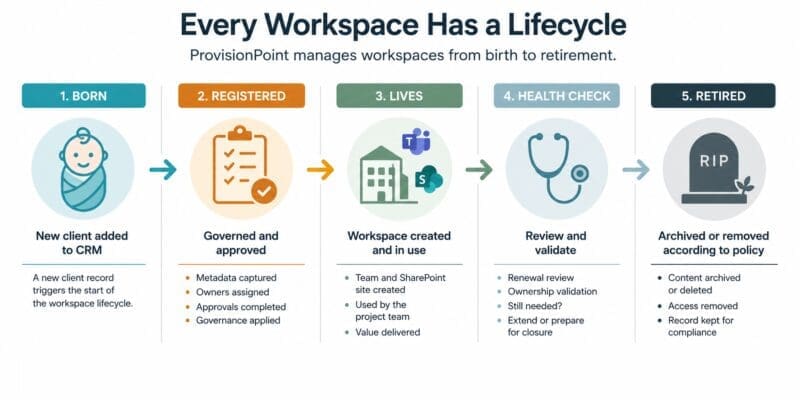
If you have a project-led organisation, you can use ProvisionPoint to replace any random, ad-hoc processes with a properly governed provisioning and ‘de-provisioning’ process.
For example, the creation of a project in a CRM, service management platform or project portfolio tool can be set up to trigger a workspace creation in ProvisionPoint.
This will ensure the right metadata is captured, the right people are set as owners, the right approvals happen, and the workspace is built to a consistent standard.
When the project closes, the same system handles what comes next (i.e. renewal, archiving, or removal of the site) according to rules the organisation has defined in advance.
The PnP template still does has a role. ProvisionPoint doesn’t replace it. Instead it wraps governance, ownership, approvals and lifecycle management around it.
What ProvisionPoint Looks Like for End Users
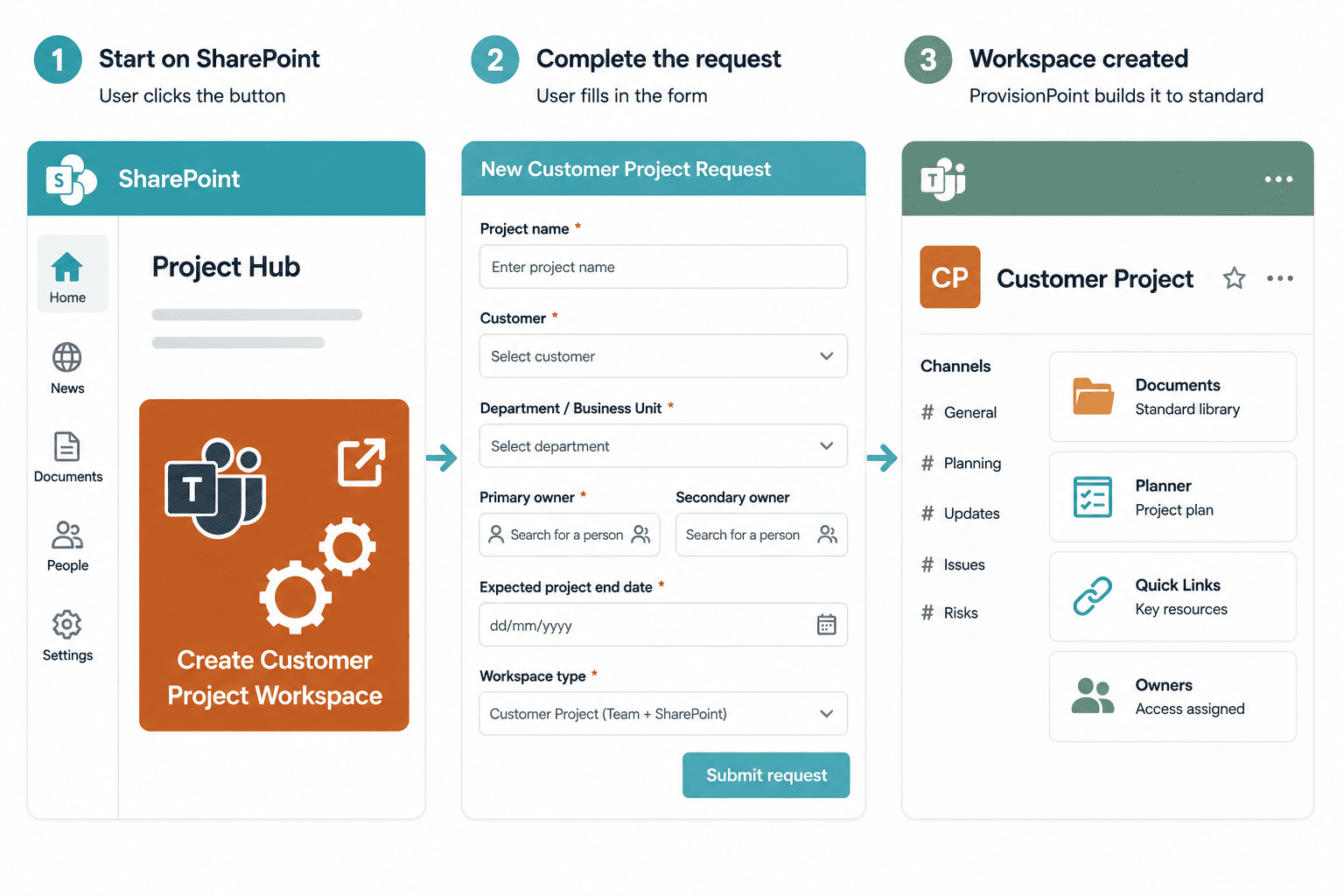
A typical request flow for a project workspace might start with a ‘button’ on a SharePoint site.
This would lead to a request form that captures project name and description, department or business unit, primary and secondary owners, workspace type, any required approvals, and the expected lifecycle or expiry date.
Behind the scenes, the governance rules configured by the organisation do the rest.
For project Teams specifically, this can extend to creating standard channels, standard tabs, Planner components, and quick links – all of which appear automatically at provisioning.
Every new project starts from the same baseline, inside a process that is auditable and supportable.
Sound Interesting?
Whilst we’re not the creators of ProvisionPoint, we work closely with the platform and support organisations like yours throughout their journey.
You pay the same price as buying direct, but by working with Essential you get access to our independent advice, hands-on implementation expertise and ongoing support from a team that understands the wider Microsoft 365 governance landscape.
Give us a shout to arrange a demo, explore some real-world scenarios and take ProvisionPoint for a test drive.