



Is it Time to Move on from Enterprise Vault ‘On-Prem’?


If your email archiving infrastructure still runs on Enterprise Vault (EV) and it’s still sitting on systems running in your office (or in a hosted data centre under your control), you’re not alone.
Many organisations continue to operate EV successfully in this way, particularly where compliance, data sovereignty, or legacy retention requirements make change difficult.
However, recent vendor changes in the past eighteen months have likely raised questions within your IT or legal team about what comes next. The product has changed ownership, operates under a new brand, and it’s likely there’ll be changes to follow.
Using Enterprise Vault.cloud?
Our latest article looks at how EV.Cloud extractions have become difficult and what to do about it if you want to perform bulk data migrations.
Even if these developments don’t threaten the platform’s future, they provide a useful opportunity to revisit a question many organisations have delayed: should we continue running Enterprise Vault on-premises, or is it time to migrate? And if we do migrate, what would that involve?
Firstly, I haven’t written this post to alarm you. Enterprise Vault remains a very capable product with a large installed base and it continues to be actively developed. However, recent changes in ownership and structure make this a sensible time to review your long-term archiving strategy and assess whether your current approach is still in line with your organisation’s operational, compliance and – let’s keep it real’ – your budget.
What Has Changed with Enterprise Vault?
It’s been a bit like a Vendor Pass-the-Parcel in the last few years:
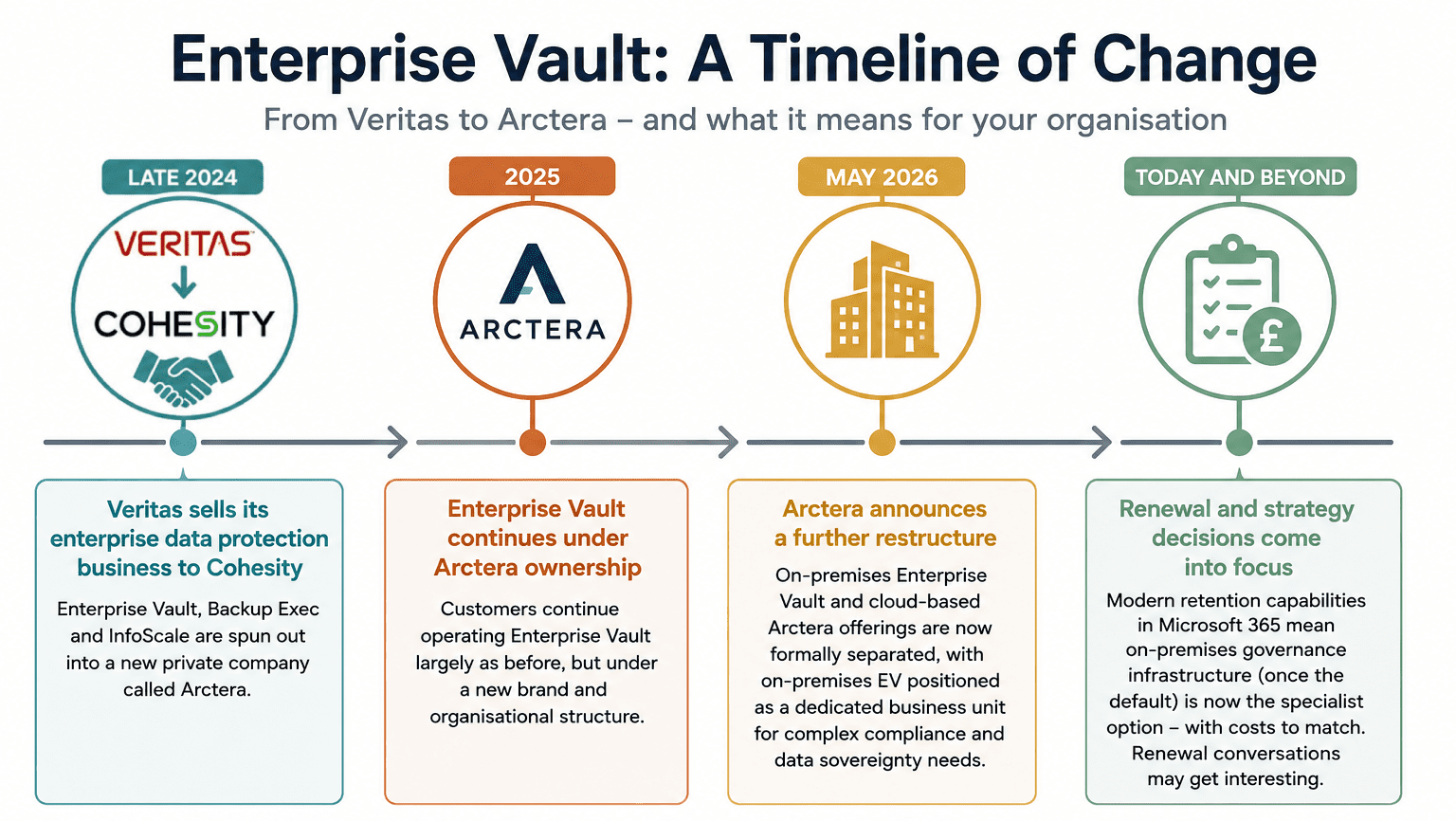
In late 2024, Veritas combined its Enterprise Data Protection business with Cohesity. The remaining businesses – including Enterprise Vault, Backup Exec and InfoScale – were separated from Veritas to form a new independent company, Arctera.
Then, in December 2025, Cloud Software Group acquired Arctera.
A further reshuffle followed in May 2026. where:
- Arctera moved to a SaaS-focused operating model with Enterprise Vault.cloud effectively becoming absorbed into its cloud SaaS compliance platform featuring components such as Arctera eDiscovery, Folder Sync, Personal Archive and Journaling. You can still, however, find references to Enterprise Vault.cloud in the documentation.
- The on-premises (or, indeed, ‘customers own cloud) Enterprise Vault business was separated out and established as its own standalone business unit within Cloud Software Group, with a particular focus on organisations that need greater control over their data, including for compliance, governance and data sovereignty.
For organisations that only need the kind of email archiving and retention that modern Microsoft 365 retention capabilities can deliver, this has reduced the need for dedicated on-premises archive infrastructure.
This is significant, because the on-premises governance infrastructure (once the default in Enterprise Vault) is now positioned as a ‘specialist option’ with costs to match.
We don’t know yet what impact this will have on existing customers intending to renew, but experience tells us that when there are significant vendor restructures, new terms and often, changes to pricing models often follow.
Your EV archive won’t stop working, but those renewal conversations might get interesting.
Why Organisations are Choosing to Move Away from Enterprise Vault
Keeping Enterprise Vault in a customer-managed environment – whether that is on-premises or hosted in your own cloud infrastructure – means continuing to manage the underlying servers, storage, EV-specific Outlook extensions, and separate processes for legal holds and eDiscovery.
That overhead can be large and will only grow over time, especially as archived data increases and storage locations multiply. Also – for organisations who keep EVERYTHING, those archives from ex-employees start to mount up and can often represent a huge chunk of the archive.
For many organisations, the true cost of running the environment is much higher than just the vendor bill, at a time when rising cloud storage and AI-related costs are already making budgets harder to control.
Microsoft 365, by contrast, gives you Exchange Online archiving, Microsoft Purview for retention policies, compliance search, and legal hold within the platform you are already paying for.
If your organisation has already moved Exchange to the Microsoft 365, running a separate customer-managed archive alongside it creates duplication of effort and a split search experience that your legal team will find frustrating.
There’s also a growing data governance case for migration, especially as organisations prepare for Microsoft Copilot.
Archived email that remains outside Microsoft 365 is not governed in exactly the same way as content held within the Microsoft 365 environment. Depending on the architecture and configuration, it may sit outside the same sensitivity-label, access-control, retention and information-governance framework applied to live Microsoft 365 content.
For organisations focused on Copilot readiness and strong information governance, this can become an increasingly important consideration.

What Migration from Enterprise Vault Involves
This is the bit that is less understood so it’s worth explaining what a well-run Enterprise Vault migration looks like.
The core migration tasks are:
- Extracting archived items from Enterprise Vault
- Rehydrating shortcuts so that users’ mailbox folder structures are preserved, and
- Ingesting content into either Primary Exchange mailboxes or In-Place Archives in Exchange Online, depending on your retention and access requirements.
Beyond the archived mailbox migration itself, two areas require careful planning: journal archives and leavers’ data:
Journal archives often need special treatment, particularly where chain of custody must be maintained for eDiscovery or regulatory purposes. They can also present a challenge because Microsoft 365 does not provide a direct equivalent to a traditional journal archive.
Leavers’ data requires similar consideration. Before migration begins, organisations need clear policies covering whose data should be retained, how long it should be kept, and where it will reside within Microsoft 365.
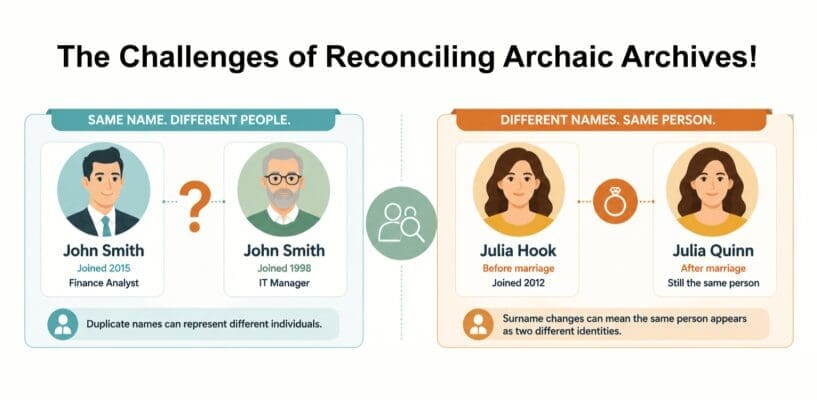
We also frequently encounter historic identity issues during migrations that involve old journals and leavers’ archives.
For example, archived content may appear to belong to two different people when it is actually associated with the same person whose surname changed after marriage. Duplicate names are also not uncommon– there may have been several John Smiths working for the same company over the years.
The important point is that there is no single approach for either journal archives or leavers’ data. Several options exist, each with different compliance, operational and cost implications. Migrating these data sets without first defining a strategy can create governance and compliance risks long after the migration has been completed.
Done properly, the result is a single searchable environment for your users, a unified compliance and eDiscovery toolset for your legal and HR teams, and the ability to decommission the on-premises infrastructure you are currently paying to maintain.
Where to Start With an Enterprise Vault Migration
- Understand what you’ve got. The practical first step is understanding your current EV environment:
- How much data do you have?
- How is your EV archive structure?
- Which vaults are still active?
- Where do your journal archives sit? and
- Are your retention policies documented?
Most organisations we work with have incomplete answers to at least some of those questions, which is not unusual for environments that have grown over many years.
- Map out your migration path. A migration assessment gives you the inputs you need to make a sensible business case: estimated timeline, data volumes, licence implications on the Microsoft 365 side, and a clear picture of what your users and legal team will experience during and after the migration.
If this is a conversation you are having internally right now, we are happy to help you think it through and give you all the intel you need to start making practical decisions.
We’ve been migrating Enterprise Vault environments into Microsoft 365 for almost 20 years (yes, that long – and yes – some of us are that old!). So we understand both the technical complexity and the governance considerations that matter, no matter what industry you’re in.