Public Folders aren’t going away, but your future migration options may be closing down


Many years ago, Microsoft announced its plans to end of life Public Folders, and lots of enterprises ‘kicked off’ big time.
It’s not surprising, as for years, Public Folders had provided a simple way for teams to share both documents and email.
Sitting inside Exchange rather than SharePoint, a Public Folder looked much like a shared folder hierarchy in Outlook, with nested folders containing emails, contacts, calendars, documents and other items. For many organisations, they became the backbone of established business processes.
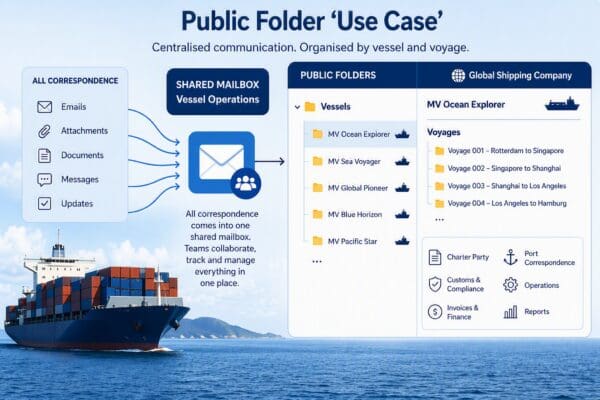
For example, one of our clients, a global shipping company, maintained a Public Folder for each and every vessel in its fleet and had subfolders for each voyage. All the correspondence relating to a vessel came into a shared mailbox and the relevant teams could work together to track and manage everything in one location.
The challenge came when organisations like this wanted to move to Microsoft 365.
Traditional Public Folders – I’ll shorten this to PFs from now on – were never designed for a cloud-first architecture. They often contained extremely large folder structures, invalid folder names, deeply nested hierarchies and decades of accumulated data making them tricky to migrate and then difficult to support in a cloud platform designed around high availability and resilience. In past migrations PF-on-prem to modern PF migrations we’ve encountered environments containing well over 230,000 folders, more than 10TB of data and individual project folders holding over a million items!
BUT customer demand was too strong to ignore, so Microsoft introduced Modern Public Folders as a supported migration path into Exchange Online. If you want to find out what’s involved in migrating from on-prem PFs to modern PFs check out this article. https://www.essential.co.uk/blog/articles/migrating-on-prem-public-folders-microsoft/
Fast forward to 2026 and if you’re still using modern PFs then great, but as an astute IT professional, you’ll no doubt be keeping an eye on what Microsoft is coming out with (and where PFs might start to fall behind the ‘curve’).
So, let’s look at some facts:
- Microsoft’s focus today is on SharePoint, Teams and the wider Microsoft 365 platform rather than on Exchange and Public Folders.
- SharePoint, Teams, Microsoft Lists, shared mailboxes and other Microsoft 365 services have evolved significantly and can often provide better governance, document management, permissions, search, compliance and lifecycle management than PFs.
- EWS is due to be retired in April 2027.
Hang on – what’s point 3 got to do with the price of fish, I hear you say!
Well, Exchange Web Services (EWS) is historically the programming interface that allows you to bulk access and manipulate anything in Exchange. This includes email, calendars, contacts, resource mailboxes, and indeed, PFs.
It was great technology in its day, but going forward Microsoft will be dropping support for EWS in favour of Microsoft Graph (its strategic API for Microsoft 365).
And – get this – the Graph API does not provide support for Exchange Online PFs. There are a few other ‘gaps’ you’ll want to check out – that is, things that are supported in EWS but not in Graph – you can check these out here https://learn.microsoft.com/en-us/exchange/clients-and-mobile-in-exchange-online/deprecation-of-ews-exchange-online
As a result, many third-party PF migration tools (and a few other tools – for example, ones that support Exchange Online Backup) that currently rely on EWS will no longer work.
So if you sitting there wondering whether your PFs could now be replaced by other services in Microsoft 365, then you should explore your options now and do something about it – rather than risk being painted into a corner because all your escape routes use a technology that is no longer supported by Microsoft.
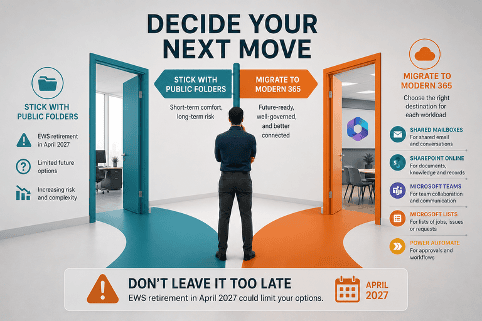
So what should you replace Public Folders (PFs) with?
There’s no single answer anymore.
Microsoft 365 now offers several services that can replace different aspects of PFs, and the right destination often depends on how each of your PFs is actually being used.
In reality, PFs often contain a mixture of:
- shared email
- documents
- calendars
- contacts
- discussion threads
- business processes
- reference information
Each of those workloads is now better served by a different Microsoft 365 service, and you need to dig into what best ‘describes’ how your PFs are being used.
A real-world Public Folder migration example
One of our Public Folder migration customers had an estate comprising:
- More than 10TB of Modern Public Folder data
- Over 22 million items
- More than 130 mail-enabled Public Folders
- Around 230,000 folders, including subfolders
- 5,500 users accessing the environment
Their objective wasn’t simply to migrate the data. They wanted to preserve the way people worked while taking advantage of newer Microsoft 365 services.
Their priorities included:
- Preserving permissions
- Maintaining access to shared email
- Finding a more appropriate long-term home for legacy information
The important thing was recognising that not every Public Folder served the same purpose, so not every Public Folder needed the same destination.
Shared Mailboxes
Where Public Folders were primarily being used to manage shared email, we migrated them to Shared Mailboxes. This allowed users to retain a familiar Outlook experience, existing folder structures and Exchange retention policies, while preserving folder hierarchy and synchronising permissions so that day-to-day working changed very little.
SharePoint Online
Other Public Folders had evolved into document repositories and knowledge stores. For those, SharePoint Online offered a much better long-term platform, with richer metadata, more powerful search, improved governance, Microsoft Purview integration, Teams integration, workflow automation and long-term records management.
Where appropriate, we also migrated email content into SharePoint, mapping email properties into dedicated metadata columns. This gives users a much more email-centric experience within SharePoint, making correspondence easier to search, filter and organise.
You can also save emails directly from Outlook into SharePoint libraries after migration – either manually or by using Outlook addins – helping to preserve familiar working practices while moving business correspondence into a platform that’s better suited to document management and governance.
In short, the best answer to your PF migration may be both or something else! Shared Mailboxes and SharePoint are just two of the possible destinations.
The table below shows some of the Microsoft 365 services that may be a better fit depending on the workload.
| If the Public Folder is used for… | Consider migrating to… |
|---|---|
| Shared email | Shared Mailbox |
| Documents / knowledge base | SharePoint Online |
| Team collaboration | Microsoft Teams (backed by SharePoint) |
| Lists of jobs, issues or requests | Microsoft Lists |
| Calendars | Microsoft 365 Group calendar or Shared Mailbox calendar |
| Contacts | Shared Mailbox contacts, Outlook contact folders, or a CRM |
| Simple forms and workflows | Power Apps + SharePoint Lists |
| Approval processes | Power Automate |
| Records and long-term retention | SharePoint + Microsoft Purview |
Our tip is to choose a migration solution that lets you migrate different PFs to different destinations, while preserving the permissions, hierarchy and metadata you need.
For example, you may well take a hybrid approach, and move mail enabled PFs to Shared Mailboxes and then migrating ‘less used’ folders into SharePoint Online for eDiscovery purposes and long-term storage.
Ideally, to help you work out what to move where (so to speak), your migration provider should also perform a full analysis of your PFs prior to moving so you can determine usage trends, sizes of folders, etc. to determine what size of shared mailbox you’ll need.
This is important as a Shared Mailbox under 50GB doesn’t require a licence, whereas larger mailboxes (up to 100GB) do. Understanding those factors upfront will help you design a migration that’s both technically sound and cost-effective!
Final thoughts
PFs aren’t dead and you don’t need to panic, but you may now be entering the second phase of your Microsoft 365 journey:
- The first phase was moving PFs into Exchange Online (aka Modern PFs)
- The second is deciding whether Exchange Online is still the right long-term home for your information and workflows.
With the EWS retirement timeline approaching, now is the ideal time to review your PF strategy, evaluate your migration options and avoid being forced into decisions later that may be trickier to act upon.