



An Explanation of the New Microsoft Places Licencing Scheme


Could this new affordable licence model expedite your move to Microsoft Places?
Over the last year or so we have seen significant changes in the features available in Places, and as of April 1st 2026 there are now some significant change in licencing to get to grips with.
Places Licensing Up Until April 2026
Prior to 1 April 2026, access to Microsoft Places features was determined by the licences assigned to individual users.
- Core – Anyone with a Microsoft 365 license (with a couple of exceptions), would get access to the ‘Core’ features of Places. These included setting a weekly work plan, viewing colleague plans, the Places card and hybrid RSVP.
- Premium – In addition to the core features, those users with Teams Premium licenses got additional functionality, including, Places Finder and booking of individual desks via an interactive floor plan.
- Copilot – A set of advanced features was available to those users with a Copilot license and included scheduling recommendations, automatic adjustments and managing conflicting recurring bookings.
Why Old Places Pricing Was a Challenge
For many organisations, the value of Microsoft Places only became apparent for those folk with a Teams Premium. However, at £7.70 per user per month, licensing everyone represented a significant investment.
Although Teams Premium includes far more than just Microsoft Places features, organisations that didn’t need these additional capabilities were finding it difficult to justify the cost purely to access enhanced Places functionality.
The same was true of Copilot. Although it introduced some useful Places enhancements, few organisations would purchase Copilot solely to access workplace management features.
As a result, many businesses found themselves comparing the cost of Teams Premium licences with dedicated third-party workplace and desk-booking solutions, often making the economics of a Places deployment difficult to justify.
Get Places quickly with our Free Readiness Assessment Tool
Introducing the New Places Licencing Model
The change to Microsoft Places licencing is fundamental and has the potential to save quite a bit of money for many organisations.
As of April 2026, all the features that previously required a per user Teams Premium licence are available to all licensed Microsoft 365 users (with a couple of exceptions).
Places licensing has now switched to a per space model (rather than the people using those spaces).
So, instead of needing to buy Teams Premium licences for every employee who might want to book a desk, you only need to license the desks and spaces that require advanced Places functionality, often resulting in significantly lower costs.
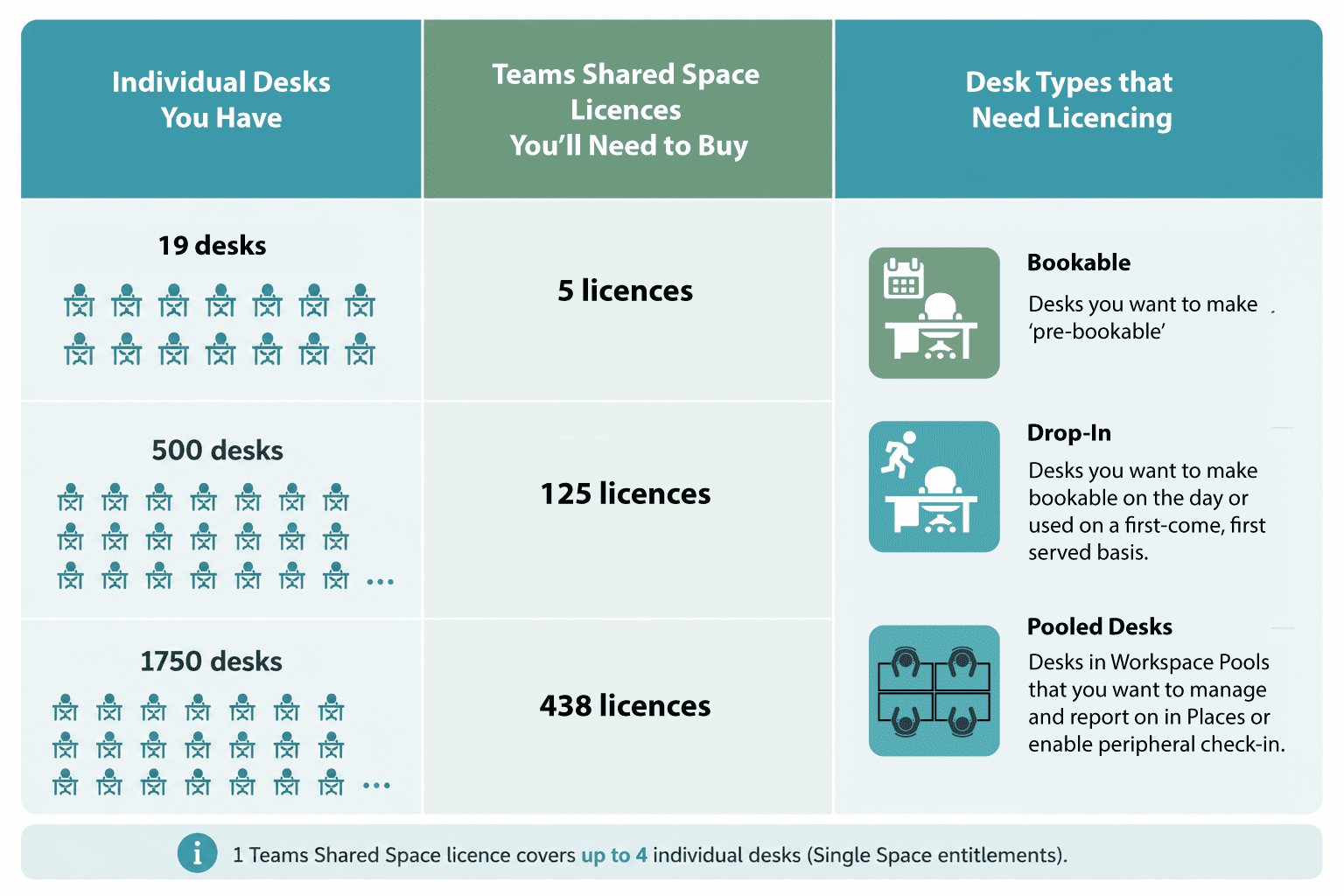
The main licence type you’ll now need is something called a Teams Shared Space License and this is what they cover:
Desks that are Bookable in Advance
A Teams Shared Space Licence is required for desks that users can reserve in advance through Microsoft Places floor plans, maps or workspace listings.
Licensing these desks also enables Places features such as desk check-in, auto-release and workplace utilisation analytics.
Each Teams Shared Space Licence covers up to four individual desks.
Drop-in Desks
A Teams Shared Space Licence is also required for Drop-In desks. These are desks that can be booked on the day, or used on a first-come, first-served basis.
As with Bookable desks, licensing enables features such as desk check-in, auto-release and workplace analytics.
Again, each Teams Shared Space Licence covers up to four desks.
So, for example, if you’re looking at 19 bookable or drop-in desks, you’ll need 5 licences.
Other Desk Types
Other type of desk, i.e. those assigned to individuals or unavailable desks (e.g. due to maintenance), don’t need to be licenced, unless:
- You want to gather analytics about these desk types.
- You may want to change them to being Bookable or Drop-in at some time in the future.
Find out more about the different desk modes available in Places >
Meeting Rooms and Workspaces
Rooms and workspaces have never needed to be licensed to be booked in advance and that isn’t changing. But bear in mind, you will need to license them if you want to:
- Manage them in the Places Directory
- Enable check-in
- Apply Places policies such as auto-release
- Enable Places management and reporting.
If your meeting rooms are already licensed as Microsoft Teams Rooms (MTRs), you’re already covered for Places.
If you have regular meeting rooms (without a Teams Room capability or where you’re using your own room panel or video conferencing equipment), you’ll need a single Teams Shared Space License for that room to get them under the ‘Places hood’.
The other thing to clarify is workspaces. These are the resources that have a capacity associated with them and that can be used to represent a pool of desks, be they bookable in advance or drop in desks.
In short, if you want to be able to report on utilisation of your pooled desk resources or enable check-in and auto-release, you’ll need to licence each individual desk in a your desk pools as described above.
Final Thoughts
We believe the move to a resource-based pricing model is a positive step. It removes barriers to adoption and recognises that, in most hybrid workplaces, desks are the scarce resource rather than users. That’s especially relevant for organisations that have downsized their office space, where there are now fewer workspaces than employees.
Companies who have already bought Teams Premium licenses for the year specifically for access to Places might feel a little miffed at the changes, but those who do not have this licensing in place will no doubt be very happy.
Licensing Isn’t the Only Cost to Consider
Whilst the new licensing model dramatically reduces the cost of Microsoft Places, organisations should remember that licensing is just part of the overall investment.
You’ll also need to factor in the time and energy required from IT and workplace teams when deploying Places:
- Resource mailboxes need to be created and standardised,
- Workspaces and desks must be configured correctly (including docking station registration)
- Places directory data needs to be populated and maintained, and
- Indoor floor plans must be created and maintained in IMDF format and correlated with physical resources.
For organisations with multiple offices, these activities can represent a substantial amount of work that should be factored into any Places business case alongside licensing costs.
There may also be some gaps you’ll want to plug in Places – especially if you’re currently using a desk booking system that includes services such as catering booking and visitor management.