7 key features of a visitor management system


A great visitor management system can provide numerous benefits to businesses that welcome contractors or clients to their workspace.
It can streamline the check-in process, reduce wait times, and create an opportunity to make a good first impression, such as knowing about any accessibility or dietary needs ‘up front’.
For those with a stringent security requirement, pre-registration can allow background checks to be carried out before arrival or ensure appropriate physical security measures are in place, such as a car inspection or a security escort.
Additionally, some organisations are required by law to maintain visitor records for compliance and health and safety purposes.
However, selecting the right visitor management solution can be challenging, as company needs can vary widely.
What is a Visitor Management System?
A visitor management system digitises visitor registration, tracking, and management. It replaces paper sign-in books with secure digital check-in, host notifications, badge printing, and compliance reporting.
In this article, we explore the 7 essential features of a visitor management system, plus must-have versus nice-to-have capabilities, security and compliance considerations, and frequently asked questions.
Easy office visitor registration for hosts
Registering visitors in advance of a visit can be a time-consuming and onerous task for hosts to undertake. Anything to make this process easier is greatly appreciated.
Given that hosts generally register visitors as part of a meeting they are hosting/organising, a logical starting place for capturing visitor information is the calendar invitation process.
For example, using ‘native’ Outlook calendar invites, hosts can:
- Confirm the date of the visit in their own calendar
- Send a calendar invitation to the visitor (which can include directions, parking information and safety protocols)
- Copy the invitation to reception staff
- Book a related resource, such as a meeting room or desk
It’s logical, therefore, that visitor registration should be available as an extension of the default Outlook calendar invitation process, with additional services that include:
- Capture of required visitor information, including special requests, wheelchair access, allergens, catering, parking, etc.
- The ability register visitors not associated with a specific meeting
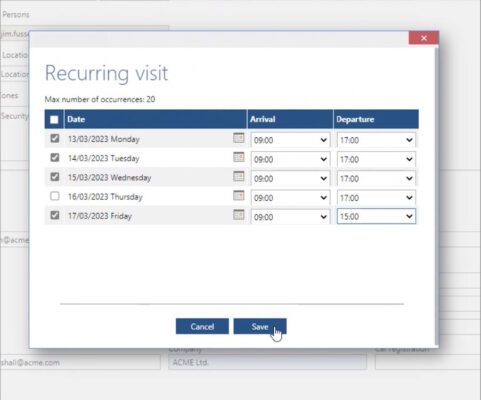
- Details associated with recurring meetings to be ‘tweaked’. For example, if a visitor decides they will come in later on one specific day out of many. The ability to quickly flex a visit will be greatly appreciated by staff, who will not want a time-consuming onerous process of adding visitors on individual days.
Flexible visitor database management
Gathering information about visitors is a crucial aspect of visitor management, but the details required can vary wildly depending on the business. Some companies are content with simply collecting a visitor’s name and company, while others that are more security-conscious, demand a much more comprehensive approach.
For these companies, visitor data can include everything from email addresses and mobile numbers to visitor types and areas they are planning to visit throughout the building.
But it’s not just about the data you collect; it’s also about how you collect it. That’s why a flexible visitor management system that allows you to tailor the information fields required for each visitor is so important.
Perhaps you want to store this personal information for future visits to speed up the registration process even further? It’s important to consider this possibility as well.
However, collecting visitor data is just the tip of the iceberg. It’s equally important to have a clear plan for removing this data either over time or upon request.
Companies may only want to store visitor data for a specific time, or they may receive requests for removal based on the GDPR. It’s critical to have an easy and streamlined process in place for data removal that doesn’t require the IT team’s involvement.
Granular visitor management security
For businesses with multiple sites spread across different cities, countries, and even campuses, managing visitors’ access to specific areas can be a real challenge. Different locations may have different requirements for visitors, with some areas needing additional levels of authorisation before entry is permitted.
However, incorporating a granular level of authorization within your visitor management system can significantly reduce the need for additional phone calls and emails between multiple teams. For instance, registering a visitor to the Research & Development area can trigger an authorisation workflow to the relevant team, who can then perform their due diligence before granting or denying access within the visitor management system.
This workflow can also facilitate the arrangement of an under-car inspection or an escort on arrival if necessary.
Having a secure visitor management system that supports authorisation processes is crucial, especially for companies with sensitive areas that require extra protection. By implementing an effective authorisation workflow, your company can streamline the visitor management process, reduce the workload for multiple teams, and ensure that sensitive areas remain secure.

“We’ve recently enhanced our visitor management system to support our very stringent security and authorisation arrangements. It’s now quicker and easier for hosts to register visitors in advance and provide all the relevant information, such as whether the visitor needs escorting. Managing visitor arrivals has also been streamlined with services that include self-service check-in kiosks and automated notifications to hosts.”
Jane Jennings
Business System Analyst
Supply Chain and FM, NATS
Sending visitor confirmations & security codes
When registering a visitor to visit your site it can be useful to be able to send a visit confirmation email.
For example, the confirmation email can include important information such as the date and time of the visit. Sending a confirmation with an ICS (iCalendar) file in a confirmation email makes it easy for the recipient to schedule the visit, avoid scheduling conflicts and get reminders about the upcoming visit.
The confirmation should also ideally include the location, directions, and any special instructions or safety requirements that will help ensure the wellbeing of your visitors.
It may also be useful to send a special code (e.g., a QR code or barcode) that the visitor can produce on arrival to be scanned by a security personnel or a kiosk at the entrance (see next point).
By scanning the code, the system can verify the visitor’s identity, check them in, and grant them access to the appropriate areas of the building or event.
The code can also contain information about the visitor, such as their name, contact information, and the purpose of their visit, which can be helpful for tracking and reporting purposes.
Sending a code can also help to streamline the check-in process and reduce the need for manual data entry, which can save time and reduce errors. It can also enhance the security of the location by ensuring that only authorised visitors are allowed in.
Self-service visitor check-ins
In today’s ever-evolving office landscape, companies are finding themselves with more and more satellite offices and empty reception areas due to hybrid working.
This poses a challenge for visitors, who might easily be overlooked in the absence of a fully staffed front desk.
Enter the self-service visitor management kiosk.
Not only does it provide a professional-looking and low-cost solution, but it also allows visitors to check themselves in, print a badge, and notify the relevant staff member of their arrival. This streamlined process ensures all visitors are processed efficiently with minimum effort, making for a positive visitor experience.
Some kiosks have the ability to scan a supplied code (e.g., a QR code or barcode) which eliminates the need to enter any additional information on screen and allow for contactless check-ins.
Another approach is to display a QR code on-screen that individuals can scan from their mobile device to access a sign-in form from. Again, this enables a touchless visitor management software experience.
It’s not just visitors who can benefit from self-service kiosks.
With employees coming into the office less frequently or booking hot desks at their nearest (not their ‘usual’ office), a self-service kiosk can be used for employee check-ins as part of your workspace management requirements.
This innovative solution can save time and resources, allowing your company to adapt to the new realities of the modern workplace.

“Working with Essential we have been able to make Microsoft Outlook the single portal via which we can book everything required for visitors to NATS’ offices. At the same time as scheduling a visit in Outlook calendar we can request meeting rooms, seating layouts, AV equipment, catering, Wifi codes, security arrangements, and so on.”
Jane Jennings
Business System Analyst
Supply Chain and FM, NATS
Automated visitor arrival notifications
I’ve sat in many a reception where an initial phone call was unanswered, and a second phone call was forgotten due to the hectic workload of a receptionist.
Thankfully, with a modern visitor management system, marking a visitor as arrived can trigger an automated email or text message to the host, eliminating the need for manual follow-ups.
Marking a visitor as arrived in a visitor management system can automate contacting the relevant person via email or even text message.
A phone call can still be made if necessary, but an automatic failsafe of email or text message makes it less likely for someone to be forgotten.
It’s also worth thinking about visitors who have been registered by someone other than the meeting host. For instance, this might be a PA registering visitors for the CEO of a company. Explore how automated visitor management alerting can be generated to the correct person in this example.
An advanced visitor management console for reception & security staff
First impressions count, especially when it comes to visitors entering a professional office. The reception team plays a crucial role in projecting a professional image and making visitors feel welcome.
By having a clear and simple list of expected visitors, reception can quickly identify who is there to see whom and where they need to go.
Customisable views can help the reception team focus on the most relevant details without getting bogged down in extraneous information.
With just a few clicks, arrivals can be registered, badges printed, and hosts notified, streamlining the entire check-in process.
A good reception view also enables filtering of who is in the building at any given time, making it easier to manage emergencies such as fire drills or unexpected evacuations.
So, investing in a visitor management system that prioritises a professional reception view is a smart move for any organisation looking to make a lasting impression on its visitors.
Must-Have vs Nice-to-Have Features
When evaluating visitor management systems, it’s important to distinguish between essential capabilities and additional features that enhance the experience.
| Must-Have Features | Nice-to-Have Features |
|---|---|
| Digital Sign-In Replace paper logbooks with secure digital check-in that captures visitor details, timestamps, and compliance data automatically. | Microsoft 365 Integration Seamlessly register visitors directly from Outlook calendar invitations and sync with existing meeting room bookings. |
| Host Notification Automatically alert hosts via email or SMS when their visitor arrives, eliminating missed phone calls and manual follow-ups. | Delivery Management Track and manage package deliveries alongside visitor arrivals with integrated courier and parcel logging capabilities. |
| Badge Printing Generate professional visitor badges on arrival with customizable designs, QR codes, and security access levels. | Evacuation Reporting Real-time reporting of who is in the building during emergencies, exportable to mobile devices for fire marshals. |
| Pre-Registration Allow hosts to register visitors in advance, enabling background checks, security approvals, and streamlined arrival experience. | |
| Compliance Logging Maintain secure audit trails of all visitor activity for GDPR, health and safety, and regulatory compliance requirements. |
Security and Compliance
Modern visitor management systems must address critical security and compliance requirements that protect both your organisation and your visitors.
GDPR Compliance
Visitor management systems process personal data, making GDPR compliance essential. Your system should include clear data retention policies, visitor consent mechanisms, and easy data deletion capabilities. Visitors must be informed about how their data will be used, who will access it, and how long it will be retained. The system should support subject access requests and allow visitors to request data deletion in line with GDPR requirements.
Fire Safety and Evacuation
In emergency situations, knowing exactly who is in your building can be lifesaving. A robust visitor management system provides real-time visibility of all visitors on-site, exportable evacuation lists for fire marshals, and integration with building access control systems. This ensures accurate headcounts during fire drills or emergencies and helps security teams account for everyone quickly and efficiently.
Watchlist Screening
For organisations with heightened security requirements, watchlist screening capabilities are critical. Advanced systems can automatically screen visitors against custom watchlists during pre-registration or check-in, flagging individuals who require additional security clearance or who should be denied access. This feature is particularly valuable for government facilities, research institutions, and organisations handling sensitive intellectual property.
Frequently Asked Questions
Do we need a visitor management system if we already have reception staff?
Yes, even with reception staff, a visitor management system provides significant benefits. It reduces the administrative burden on reception teams, ensuring they can focus on providing excellent customer service rather than manual data entry. The system automates host notifications, badge printing, and compliance logging, making the process faster and more reliable. Additionally, many modern workplaces operate with reduced reception hours due to hybrid working, making self-service kiosks essential for maintaining professional visitor experiences outside staffed hours.
Can visitors use their own mobile phones to check in?
Absolutely. Modern visitor management systems support contactless check-in via visitors’ own devices. Visitors can scan a QR code displayed at reception to access a mobile-friendly sign-in form, or they can use a pre-sent QR code from their registration confirmation email. This touchless approach improves hygiene, speeds up the check-in process, and provides a more convenient experience. Some systems also allow visitors to complete pre-registration forms on their phones before arrival, making on-site check-in nearly instantaneous.
How does visitor management integrate with Microsoft 365?
Leading visitor management systems integrate seamlessly with Microsoft 365, allowing hosts to register visitors directly from Outlook calendar invitations. When creating a meeting, hosts can add visitor details as part of the same workflow they use to book meeting rooms or invite colleagues. The system synchronizes with Exchange calendars, automatically creating visitor registrations, sending confirmation emails with visit details, and coordinating with reception staff. This integration eliminates duplicate data entry and ensures visitor management fits naturally into existing workplace workflows.
What happens to visitor data after they leave?
Visitor data handling must comply with GDPR and your organisation’s data retention policies. Most visitor management systems allow you to configure automatic data deletion after a specified period, such as 30 days, 6 months, or 1 year, depending on your compliance requirements. Visitors should be informed at check-in how their data will be used and retained. The system should also support manual data deletion for subject access requests and provide audit trails of all data access and deletion activities. It’s essential to balance security and compliance needs with privacy obligations.
Can we use the visitor management system for contractors and regular visitors?
Yes, most systems excel at managing both one-time visitors and regular contractors. For contractors who visit frequently, you can store their information securely to streamline future registrations, avoiding repetitive data entry. The system can support different visitor types with customized workflows—for example, contractors might require additional health and safety induction confirmation, while clients might receive different badge designs. Recurring visit patterns can also be configured, allowing you to register contractors for multiple dates at once or set up standing permissions for regular access.
Discover how to add advanced visitor management to your Microsoft 365 room bookings
Arrange a demo today.