

Best practices for numbering desks in booking systems


Now, as office spaces are being remodelled – and in many cases reduced – to support hybrid working, employees increasingly need to pre-book a specific desk before coming into the office to ensure workspace availability.
And it’s highly likely this could be a different desk each time, depending on the purpose of the office visit. For example, many modern desk booking systems can indicate where co-workers are planning to sit when they next visit the office, enabling colleagues to book nearby desks.
However, one of the most overlooked aspects of implementing a desk booking system is physically numbering and labelling the desks themselves so that they clearly correspond with the desk IDs shown in the booking system.
This is an absolute must-have and forms the foundation for everything else that follows. Without clear physical desk identification, even the best desk booking platform can quickly fall apart operationally. If someone books Desk 36 but can’t actually locate Desk 36 when they arrive, there’s a high risk they’ll sit in the wrong place – creating confusion, double-bookings and mistrust in the system.
Your workforce may also need to visit different office locations, or entirely new offices they are unfamiliar with. Don’t forget new starters who may have no familiarity with your office layouts at all.
This makes having a logical desk numbering system – one that makes it easy for people to find their booked workspace on arrival – critically important.
Here are the top best practices when it comes to numbering and labelling your desks and workspaces – regardless of whether you’re using a third-party desk booking system of Microsoft Places.
Want more expert advice on preparing your floorplans for Microsoft Places?
1. Replace any ‘legacy’ desk numbering schemes
Although it is possible to reflect pre-existing desk numbers in your booking system, many organisations are taking the opportunity to re-number their desks ‘from scratch’.
In our experience old CAD diagrams and numbering systems can quickly become out-of-date: Desks can get informally ‘nudged’ around and added or removed over the years.
This can lead to out of sequence numbers that will make it extremely difficult for users of the system to locate their booked desk without lots of ‘hunting around’.
2. ‘Walk the floor’ in person to work out how to number desks
Without a shadow of a doubt, when you’re numbering workspaces, the best way to do it is to ‘walk the floor’ in person. If you can’t visit the site, imagine you’re walking around the floor whilst looking at your CAD diagram.
AND THIS IS REALLY IMPORTANT:
We recommend that you make ‘desk number 1‘ (or lowest numbered desk on that floor) the first desk you would physically see/encounter as you walk into the main entrance to the office floor.

Numbering should then be applied logically from that point on using the following conventions:
- Apply numbers to each ‘bank’ of desks in a clockwise* (or regular) fashion where possible.
- If there is a logical area, zone or room, treat that area as a separate entity and circulate clockwise* within that zone, even if the zone cuts across a walkway.
Consistency is key, as is visibility of your numbers (see point 5). This will help ‘users’ of your office intuitively understand how to navigate to their booked workspace.
Keep desk numbering grouped by logical zone. This cuts down on floor-wide criss-crossing, helping minimise interruptions for a calmer, more focused setting. This was an important factor for one of our customers that wanted to make provisions for neurodiversity within their workforce.

3. Future proof your desk numbering system
It’s inevitable that your office floor plans will change over time, but here are a few tips that will minimise the amount of changes you will need to make to your desk booking system.
Number all workspaces – We recommend that all potentially bookable workspaces are assigned numbers, even if not all of them are currently bookable within your desk booking system.
This means if anything changes in the future, you’ll just have to amend what’s bookable in your workspace management system, and not need to make any changes to your floor plan or physical signage.
We have seen (and thankfully, averted) more than one project where the initial intention was to number just to the ‘safely distanced’ desks (see example below).
As this company has now progressed to a fully bookable hybrid working space, an approach like this would have rapidly become out of date had it been implemented.
For example:

4. Simplify your desk numbering convention for users
If you have a single, relatively small office space and just a few floors, a numbering scheme that by design accommodates the ‘floor level issue’ is to prefix the desk number with the floor number.
E.g., 038 would be desk 38 on the ground floor, desk 139 would be the 39th desk on the first floor.
Having a convention for identifying desks in larger organisation can be a challenge, especially when there’s many different locations, buildings, floors and so on.
It’s not untypical for our customers to use a numbering nomenclature that includes the following attributes into a desk ID:
‘LOCATION CODE’ + ‘BUILDING CODE’ + ‘FLOOR NUMBER’ + ‘DESK NUMBER’
This would result in, for example:
BRS 1A F1 D067
Whilst this lengthy code can exist ‘behind the scenes’ in your desk booking system (for example, so you can report on desk utilisation by location), it’s not necessary to label your floor plans or desks with this full code.
Why? Consider these points:
- Physically applying such a long number to each desk on the floor plan would be visually confusing
- Desk availability, location and facilities are typically more important factors than the actual desk number at the point of booking the desk*
- The location, building and floor level is embedded in the floor plan navigation experience and can be added to the floor plan graphic, making ‘LOCATION CODE’ + ‘BUILDING CODE’ + ‘FLOOR NUMBER’ + irrelevant
- Ditto, your office buildings will be physically labelled with the location and floor levels.
These are our recommendations:
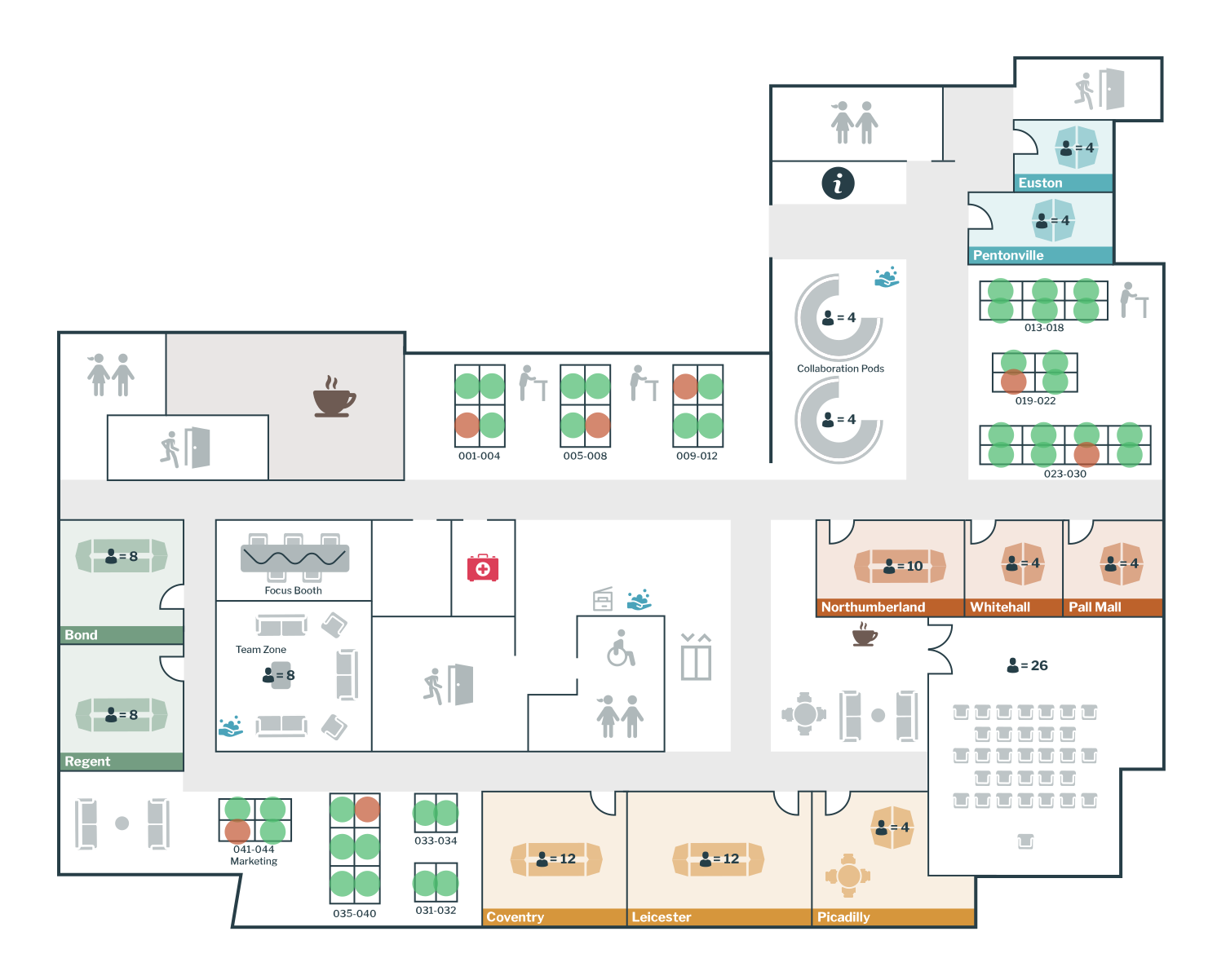
Use just ranges of numbers on floor plans
For the best UX when labelling your floor plans, we recommend adding just a range of numbers under each bank of desks or logical area.
Add desk way-finding signage to your office spaces
To help individuals locate their booked desk on arrival, emulating the convention that’s used to signpost hotel rooms will help your staff rapidly locate their workspace with the minimum of effort (and minimal criss-crossing the floor).
5. Individually label your physical desks
Returning to a ‘hybrid office’ space, with different desk layouts and new collaboration spaces can be daunting enough – even more so if you’re a ‘new start’.
The last thing you’ll want is an argument over whether you’re sitting at the right desk or not.
Surprisingly, it’s not uncommon for this vital component of implementing a successful desk booking system (i.e. labelling desks) to be overlooked.
In short, the desk numbers or ‘IDs’ used in your desk booking system and floor plans should always be indicated on your physical workspace.
Only this way can users of the system ensure that the desk they have pre-booked is the desk they’ve arrived at.
You may also wish to enforce authenticated check-in (e.g., using your staff ID cards) to ensure that the correct user has arrived at the correct desk.
As discussed in the previous point, for the best user experience, your label should put the emphasis on the most relevant aspects of the desk ID, i.e., Desk Number and Floor number, and have the other elements in ‘small print’.
You may, of course, elect to use the concept of ‘pools of desks’, where a group of say, 10 desks can be made bookable, and it doesn’t matter which desk you sit at (therefore you don’t need to apply desk numbers). You can read more about desk pools here>
6. What’s the best way to physically number desks?
When considering how you’ll apply numbers to your desks, there are many neat and low cost options open to you.
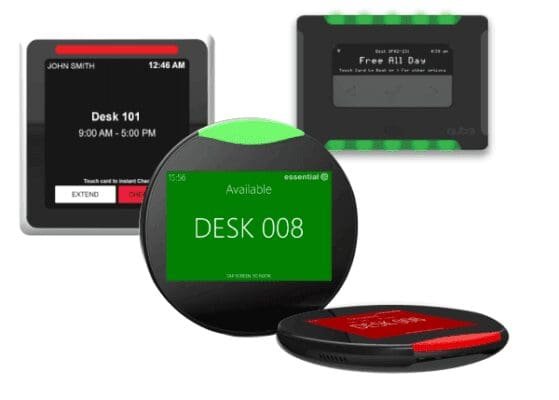
Individual desk devices can be pricey but are a neat device that offers many benefits including:
- Highly visible glowing free/busy status
- Desk ID or bookee’s name
- Contactless booking and check-in functionality
- Your company branding.
Desk devices also make changing desk numbers really easy!
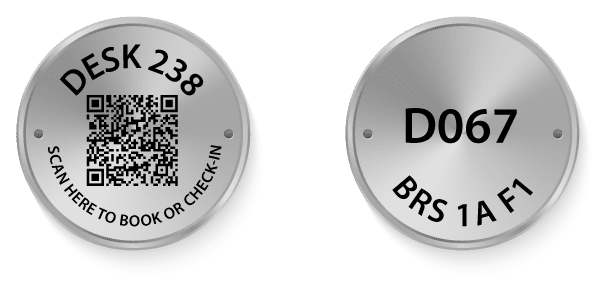
Engraved disks
During the pandemic, many restaurant and bar owners scrambled to adopt QR code ordering for contactless service and deliveries. This same approach is supported by many desk booking apps.
Not only are they nice and neat, they don’t cost a lot at all and come with different fixings. Check out our favourite supplier’s options.
As part of our workspace booking systems delivery service, our team will help you generate an excel spreadsheet of QR codes to create your desk disks. Get in touch for more information.
Simple cards
Combined with a card holder clip that sits nicely on top of workstations, this is a simple but elegant approach to ensuring your desk booking system works smoothly. They can also be made highly visible as shown in the customer example below.
They cost just 5 pence each and all you need is some coloured cards and a printer! You could also incorporate a QR code into the sign. Again, our service includes creating a spreadsheet of your workspace IDs so you can create labels in Microsoft Word.

Enterprise Desk & Room Booking Systems
Thinking of updating how you use your workspace? We have over 15 year’s experience and can help guide you through your options – and how to create your optimal floor plans.