Page Title

H1
H2
H3
H4
H5
Quote
Call To Action 01
Call To Action Subtitle
Call To Action 02
Whats in this article Componenet
[ hide ]Content Container Component with 2 columns on dark blue
Pros
- Bullet Point
Cons
- Bullet Point
Book a Demo or Request a Quote
Content Container Component with 1 columns on dark blue
- Bullet point
- Bullet point
- Bullet point
- Bullet point
- Bullet point
- Bullet point
- Bullet point
Content Container Component with 1 columns on grey
- Bullet Point
- Bullet Point
- Bullet Point
- Bullet Point
- Bullet Point
- Bullet Point
- Bullet Point
2 Column with info component on the right
Essential has help UK Police force with our LMS solution
What our customers have to say
Essential were supportive during the implementation phased and helped us with our design, integrations, and communications. I’ve been impressed with how seriously they take our comments and seen vast improvement to the system in the three years I’ve used it.
Harriet Smith, Digital Learning Producer at Historic England

What our customers have to say
“The team at Essential have been super supportive and are very
hands-on with our LMS. They gave us expert advice on getting the
look and feel right and integrating our colours and brand.
They continue to be there when we need something or if we’ve
any issues.”

Beth Lloyd, Director, Organisational Development at Aston University
What our customers have to say
The service we’ve received from Essential has been nothing short of impeccable. The team are always on hand to answer our questions, response times are usually less than a day.
Harriet Smith, Digital Learning Producer at Historic England

What our customers have to say
“On-line training means you don’t have to get a whole bunch of new starts in one room at the same time to do the training. It’s just more convenient.”
Gideon Tester, Business Digital Systems Manager, Altro Floors

Image on left component
Image and content component (Used with images and content)
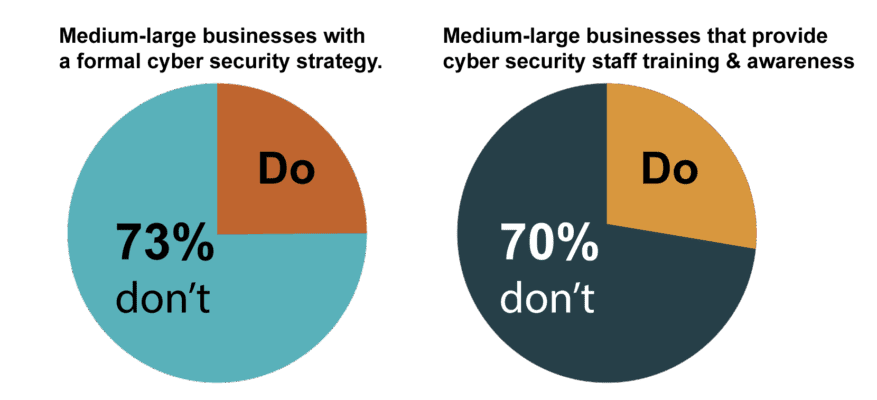
- 30% of large businesses and 43% of medium-sized businesses still do not have a formal cyber security strategy in place.
- 24% of large businesses, 46% of medium-sized businesses do not provide any staff training and awareness around cyber security.
Get-Module SharePointPnPPowerShellOnline -ListAvailable | Select-Object Name,VersionImage component (used if images do not fit the entire width of the container)
Problem: I’m trying to book desks via the map but can’t see any desks
Fix: Try zooming in on the map. Desk availability indicators only appear once you zoom in. Check out this video for more information: https://www.essential.co.uk/blog/videos/booking-desk-using-places-2026/
Problem: I can’t see any desk bookings I’ve made in Outlook calendar
Fix: Check the filters applied to your Outlook calendar. Desk bookings are now listed under Reservations, which is unticked by default, so you’ll need to enable this filter to see your bookings. Check out this video for more information: https://www.essential.co.uk/blog/videos/booking-desk-using-places-2026/
Problem: We have desks on our map in Places, but they don’t show up, while deskpools do. I can select the desk in the map, but there is no visual on the map.
Fix: You most probably have the category in the IMDF set to desk. Change it to workspace and this will fix the issue.
Problem: Getting “You don’t have permission to do this” when accessing the Places Space Management Portal
Fix: You may have previously been a member of a Places admin group, but this has now been superseded by three new Places admin roles, which you must now be a member of.
Read more here: https://learn.microsoft.com/en-us/microsoft-365/places/configure-admin-roles
Problem: “Buildings not showing in users’ weekly work plan view”
Problem: “Expected ‘Section’, found ‘Floor'”
Along with the new desk type, a new section type has been introduced.
Sections act as a neighbourhood or zone and are a subdivision of the floor.
It is now a requirement that workspaces and desks must be parented to a section and cannot be parented directly to the floor, which was previously possible.
Rooms can optionally be parented to a section or directly to a floor.
Problem: “No levels were found correlated to directory floors for the building”
Fix: This issue indicates there is no feature with a directory_id linked to the floor.
To resolve this:
First, generate a CSV of all buildings, floors, and resources from Places. Then import your IMDF using Import-MapCorrelations. This generates a mapfeatures.csv, which must be manually updated with data from your initial CSV. Once updated, import the IMDF again with the modified mapfeatures.csv. Finally, save the newly correlated IMDF and use New-Map, ensuring it references the correlated IMDF rather than the original.