
Data Security & Governance
Getting control of Microsoft 365 in 2026: Reduce storage costs, security risks and Copilot exposure


For years, the default assumption has been that cloud storage is effectively unlimited and relatively inexpensive.
I recall one customer telling me: ‘Cloud storage is so cheap I don’t care’, when planning a data migration project.
That mindset, combined with the ease of creating modern SharePoint sites – and the fact that every Team comes with a SharePoint site behind the scenes – means workspaces are now multiplying like rabbits, expanding the number of places where information is stored. Plus content is rarely deleted and often kept ‘just in case.’
But over time, growth creates a different problem: Old projects linger, duplicate files accumulate, and ownership becomes unclear.
TL;DR?
Whether you’re thinking of rolling out Copilot or not, having a damned good clear out of the data in your Microsoft Tenant is a good idea.
It can save you money and make it easier to manage security.
Such ‘sprawl’ isn’t just increasing storage costs – it’s widening your security exposure and making it all harder to control.

So now, in 2026, we’re seeing UK organisations we work with dealing with one or more of three main pressures:
- Storage costs rising quietly until renewal time
- Security and compliance risks buried in legacy content
- The risk of Copilot digging up data that was never meant to be reused.
This article focuses on having a Microsoft 365 data clean-up, controlling your storage costs, reducing your risks, and (although it may be low on your agenda for this year) getting ready for Copilot. It explains why environments drift out of control and outlines practical first steps organisations are taking to regain visibility before introducing governance or AI at scale.
The hidden cost of Microsoft 365 storage growth
Microsoft 365 storage is an expected cost of doing business. Bills for unplanned storage are neither expected or welcomed.
When organisations hit unexpected storage pressure, it is rarely due to one large mistake. It is usually the result of small, reasonable decisions made over several years, like project Teams never closed or archived, SharePoint sites created “just in case”, or OneDrive content retained indefinitely.
One example that’s hit a customer of ours, was never changing the default versioning controls, meaning hundreds of versions of documents were created and retained indefinitely! Individually, these don’t look like major headaches but collectively, they drive steady, unmanaged growth.
What makes this so much harder is that native Microsoft views often tell you how much storage you are using, but not why it is growing or where action will have the most impact.
Reducing storage costs starts with visibility. Once you can see which workspaces inactive, which files carry excessive versions, and where data no longer serves a business purpose, cost reduction becomes a set of manageable decisions rather than a blunt clean-up exercise.
SharePoint and Teams sprawl increases cost and security risk
Data sprawl is often treated as an inconvenience, but it actually has wider consequences. Adding AI to the mix just shines a light on the mess.
As the number of sites grows, permissions become inconsistent, ownership becomes unclear, search quality gets worse and sensitive content is harder to track and manage.
We often see organisations attempt a periodic clean-up (we’re guilty of that ourselves).
And these do help, briefly. But to really resolve the cost and risk issues of data sprawl you need a solid onward governance plan for data lifecycle management, so the problem doesn’t pop back up.
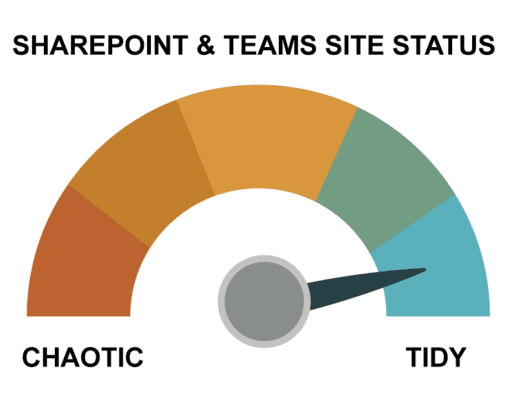
Yes, it can be a somewhat ‘dry’ subject, data governance. But like most things in life, it’s the boring, consistent actions which yield long term results. Sorry, not sorry.
So clean your house, before shining those bright lights of AI (which will only show up all the accumulated dirt and dust).
Join us for our upcoming webinar!
Learn practical strategies for cleaning up that will pay dividends way beyond ‘Copilot readiness’
Common Microsoft 365 security risks caused by unmanaged content
No one designs their Microsoft365 tenant to be insecure. The reality is that the risks creep in gradually over time.
Common things we see include external sharing links that were never reviewed, guest users attached to long-finished projects, and permissions inherited from structures that no longer reflect how teams work.
These risks rarely trigger alerts at the time but remain like silent time bombs. They then surface later, during audits, incidents, or AI rollouts.
Improving security doesn’t have to mean a disruptive programme. Organisations that make progress tend to tighten sharing defaults, review guest access at scale rather than site by site, identify orphaned workspaces with no active owners, and create clearer accountability for ongoing review. Again, clarity and visibility is the constraint; in other words, you can’t secure what you can’t see.
Why Copilot exposes poor Microsoft 365 data hygiene
For many organisations, 2026 is the year Copilot and Enterprise AI moves from pilot to production, from spend to justification.
Copilot accelerates access to what already exists- and this is where the challenge lies when content is unmanaged.
So, this means that preparing for Copilot or any enterprise AI solution is not primarily a licensing exercise. It is an extension of good Microsoft 365 hygiene:
- Relevant data, not everything
- Appropriate access, not historical convenience
- Confidence in what content represents today
Organisations that treat Copilot and enterprise AI readiness as separate from governance tend to struggle. Those that see it as a forcing function to tidy up their tenant make faster progress.

Why a Microsoft 365 data clean-up should come before governance
Microsoft 365 governance works best when it is applied to a known, current environment.
Applying policies to years of unmanaged SharePoint sites and Teams often increases friction rather than control. For most organisations, data clean-up is a prerequisite for effective Microsoft 365 governance, not an alternative to it. In practice, most organisations benefit from pausing and asking a simpler question first:
“What do we actually have today?”
Starting with clean-up delivers three things quickly:
- Cost reduction where it matters most
- Reduced security exposure
- A stronger foundation for governance and AI
Only once that baseline is clear does it make sense to automate, delegate ownership, or introduce tighter controls.
This is why many organisations now start with an audit-led approach to a data spring cleaning. Not as an end in itself, but as a way to replace assumptions with evidence and move forward with some confidence.
What to do next:
If storage costs are rising without a clear explanation, uncertainty around who owns what is growing, hesitation around Copilot rollout is holding you back, or lack of time to investigate manually is a constant barrier, then the next step is to get some clarity on where you stand today.
Our upcoming webinar explores the common ways Microsoft 365 environments drift out of control and how organisations identify the biggest cost and risk drivers quickly.
We’ll discuss why clean-up works best before governance and AI initiatives and share practical examples of how teams regain control without disruption.
Whether you are actively tackling these issues or simply sense they are building, the aim is the same: clarity before complexity.
Join us for our upcoming webinar!
Learn practical strategies for cleaning up that will pay dividends way beyond ‘Copilot readiness’