




Microsoft Places
An Explanation of the New Microsoft Places Licencing Scheme


Could this new affordable licence model expedite your move to Microsoft Places?
For many years, Microsoft has enabled organisations to book rooms and other shared spaces through Exchange.
Tools like Room Finder and the Scheduling Assistant made it easier to find an available space at a suitable time and with suitable facilities (e.g. AV equipment).
As its name suggests, Room Finder is largely meeting-room centric, although it’s now possible to book shared workspaces with a designated capacity, where individual desks can be configured as Workspaces with a capacity of 1.
Microsoft Places represents a major upgrade to this functionality:
TL;DR?
As of 1st April 2026, Microsoft Places will become much more affordable.
– Is Places now right for us?
– Can it replace our current system?
– Can we switch to Places seamlessly?
We can answer these questions and more!
Instead of simply helping users find an available room or workspace, the Places Finder and Places app make it easier to see when colleagues plan to be in the office, explore available spaces, and choose locations that support in-person collaboration.

Places also introduces richer ways to browse and book meeting rooms as well as shared and individual desks.
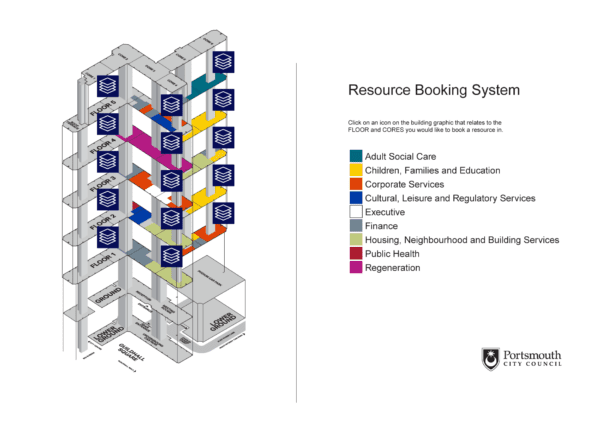
It also offers interactive maps in addition to filtered lists to make things easier still.
Over the last year or so we have seen significant changes in the features available in Places, and as of April 1st there’ll be some significant change in licencing to get to grips with.
Here’s an explanation...
Places Licensing Up Until April 2026
The Places features until now have been split into three, based on the Microsoft 365 licenses assigned to each user.
- Core – Anyone with an Microsoft 365 license (there are a couple of exceptions), gets access to the ‘Core’ features of Places. These include, setting a weekly work plan, viewing colleague plans, the Places card and hybrid RSVP.
- Premium – In addition to the core features, those users with Teams Premium licenses get additional functionality, including, Places Finder, booking of individual desks and Places Explorer. Within these extra features is the well-publicised interactive map/floorplan views of the office.
- Copilot – The final set of features are available to those users with a Copilot license and are designed to make scheduling more intelligent. Extras include scheduling recommendations, automatic adjustments and managing conflicting recurring bookings.
To summarise, to date, ‘non-core’ Places features needed to be licensed per user.
Challenges with the ‘initial’ Places licensing model
The licensing model initially introduced with Places poses some challenges.
Firstly, and perhaps most obviously, there is the cost. At around £7.70 per user per month, a Teams Premium licence represents a significant investment when compared with the pricing of many third-party workspace booking solutions.
Although Teams Premium includes far more than just Microsoft Places features, organisations that don’t need these additional capabilities were finding it difficult to justify the cost purely to access enhanced Places functionality.
The same goes for Copilot. It’s not, realistically speaking, something you’d purchase purely for the Places features.
In companies with a lot of staff, licensing everyone for Teams Premium and/or Copilot is going to be costly.
You also had the issue of having just a subset of staff licensed for Teams Premium and using Places Finder, whilst the rest would remain in Room Finder.
Here you’d have the complexity of those using Room Finder not being able to see or book any individual desks, because bookable desks are only supported in the Places directory – unless you configure desks as workspaces with a capacity of 1 – which is a bit of a ‘hack’. You can read more about Desks vs Workspace resources here>.
Get Places quickly with our Free Microsoft Places Discovery Service!
What’s Changing On April 1st 2026?
Well, it’s quite fundamental and has the potential to save quite a bit of money for many organisations. No longer will the Places features be licensed on a user basis.
As of April 2026, all the Places ‘Premium’ features will be available to all licensed Microsoft 365 users (with a couple of exceptions).
This will allow everyone in a company to enjoy the same collaboration and booking experience with access to the Places Finder, Places app, maps and so on.
What if my Teams Premium licences run out before April 1st?
If your Teams Premium licence ‘runs out’ before the 1st of April, there’s an unpublished option called a Standalone Places SKU. This is a per user licence that is designed to bridge between now and April 1st if your Teams Premium licences are set to run out before April Hits – your Microsoft account team should be able to tell you more about this.
What’s the Catch With the New Places Pricing?
There isn’t a catch as such, however, licensing is still required for certain things.
Firstly, if you want to be able to book individual desks in advance, these will need licensing. You’ll also need to license any other type of desk (i.e. walk-up desks or those assigned to individuals) if you want to store analytics about their usage.
Rooms and workspaces have never needed to be licensed to be booked in advance and that isn’t changing. But bear in mind, you will need to license them if you want to manage them in the Places Directory and assign policies such as auto-release; assuming that it’s not already licensed as a Microsoft Teams Room (MTR), in which case you’re already covered.
The licensing for desks is now called a Teams Shared Space License and each license can account for up to 4 desks. So if you’re looking at 20 desks you’ll need 5 licences.
If you needed to license a regular meeting room (without a Teams Room capability), then you’ll need a single Teams Shared Space License for that.
What can I do Without any Extra Cost?
The new licensing model in effect means that you can use all the cool things in Microsoft Places without any extra cost, if and only if, you are not interested in any of the advanced features and analytics.
If you’re purely concerned about seeing where your colleagues intend to be and then being able to book rooms and workspaces, you can enable and use the Places features, including the interactive maps without any extra licensing cost. The only required investment would be the time to create and configure the resource mailboxes, Places directory and the IMDF maps.
If you want to perform desk bookings in advance and make use of all the extra features and analytics that Places brings, then you will need to audit what you have already licensed for your rooms and purchase new licenses for your desks.
Example: 20 desks = 5 licences
1 licence per non-MTR meeting room if Places management is required
Final Thoughts
In our view the switch to a resource-based pricing model makes total sense. It helps removes barriers to adoption and reflects the fact that desks and rooms are the limited resource in a workplace. This is especially the case for enterprises that have downsized their office space in response to hybrid working.
This may not be the only change in licencing you’ll see over time. Places is a moving target with new capabilities appearing (and some disappearing) over time, so watch this space.
Companies who have already bought Teams Premium licenses specifically for access to Places might feel a little miffed at the changes, but those who do not have this licensing in place will no doubt be very happy.
Those who have been using native Microsoft features for booking for a while will still have work to do. For example, if you rolled out desk booking using the workspace mailbox type with capacity of 1 and want to change this to the new desk objects in Places, there is no shortcut. You have to start again!
For organisations choosing to fully adopt Places, careful planning and implementation are essential and often benefit from specialist support. This typically includes help with creating and maintaining IMDF-compliant maps for workspaces.
Finally, be prepared to adapt as both Places capabilities and your requirements will inevitably change over time.