


Desk booking using Microsoft resource mailboxes VS desk objects


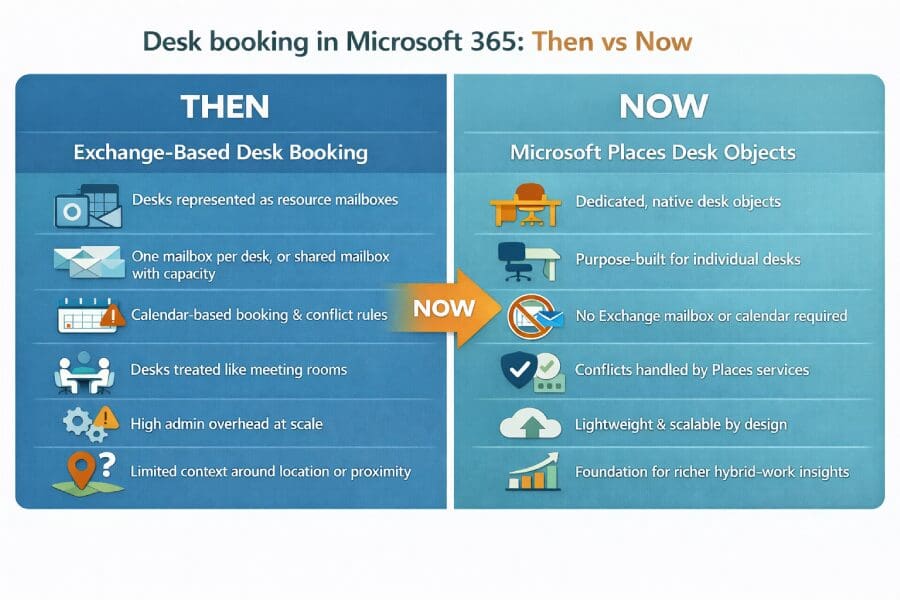
If prior to 2025 you wanted to allow the booking of individual desks using ‘native’ Microsoft 365, your best option was to use resource mailboxes.
As of 2025, Microsoft Places now includes a native Desk object that represents individual desks more accurately than resource mailboxes and offers a modern, ‘lighter-weight’ alternative for organisations planning hybrid working solutions.
This is what you need to know:
What is a resource mailbox?
A resource mailbox is a Microsoft Exchange mailbox that can be associated with resources, such as meeting rooms and equipment. Unlike a regular user’s mailbox, it is disabled for sending or receiving emails, but it does have a calendar associated with it.
If the resource’s calendar indicates availability, the resource can be configured to auto-accept an invitation to a ‘meeting’ (or rather, a booking).
You can also associate rules with the resource mailbox, for example, making accepting an ‘invitation’ subject to approval by a ‘delegate’ person associated with that mailbox, such as a facilities manager or the reception team.
Resource mailboxes can also have attributes, such as room capacity, equipment and location, which, when properly configured, can assist with selection of the resource.
Can I use resource mailboxes to book individual hot desks?
Yes. Until a few years ago there were only two resource mailbox types:
- Room mailboxes – ideal for representing available meeting rooms but they can also be used for other location-specific workspaces such as a demo suite or training room.
- Equipment mailboxes – ideal for representing ‘floating’ resources such as projectors and pool cars. They are not typically associated with a given location and have fewer attributes.
At a ‘push’ room mailboxes could be used for booking individual desks, however In mid-2020, a new Workspace resource was introduced.
This is a bookable resource that can be associated with an overall capacity. This capacity is then enforced by Exchange by allowing multiple bookings for a workspace up to the maximum available.
For example, if you configured ‘Neighbourhood A’ with a maximum capacity of 30, it would allow 30 separate bookings to be made, all managed by just one resource mailbox, rather than 30 individual ones.
To book individual desks using the workspace resource mailbox, you essentially need to create a Workspace Resource with a capacity of 1.
Request our free ebook on how to configure Workspace Resources
What is the new Desk Object?
In mid-2025 a new dedicated desk object was introduced.
Desk objects are lightweight, purpose-built workspace resources that are used to represent specific desks without relying on ‘mailbox workarounds’.
The change was made in recognition of the fact that desks have very different usage patterns to meeting rooms or shared resources.
By comparison, desk objects do not use Exchange calendars.
This means desk objects are much less processing-intensive than mailbox-based desks because they do not rely on Exchange mailboxes or calendar processing. This removes a ‘not insignificant’ amount of background processing needed to management meeting requests, conflict handling, and free/busy updates.
Instead, availability and conflicts are handled directly by Microsoft Places, making desk booking simpler to manage and easier to scale.
This means, of course, that desk objects are only available to use if you’ve rolled out Places services, you can’t use them with ‘classic’ Exchange calendar processing and the Room Finder.
So, if you want to allow booking of an individual desk and you’re still using the regular Room Finder (and not Places), you’ll have to:
- Create a resource mailbox per desk, or
- Use a workspace mailbox with a capacity = 1
As an aside, some early adopters of Places (that rolled out Places prior to the introduction of the Desk object) used the ‘Workspace Mailbox with a capacity of 1’ approach to represent individual desks.
Whilst this approach technically ‘works’, it is not in line with Microsoft’s roadmap and may create problems down the track. We will bring you more information on this later…
If you’re not quite ready for Microsoft Places but want to make sure you’re getting the most out of native Room Finder capability, check out our article on mastering Microsoft Room Finder.
Conclusion
For more than 15 years, Essential has been helping organisations solve the practical challenges of workspace booking – long before hot-desking became a mainstream ‘thing’.
In that time we’ve watched early solutions evolve to deliver more streamlined and flexible approaches desk booking in comparison to meeting room booking.
The fact is, there are usually so many more desks than meeting rooms, and in a hybrid office, desk booking needs to be fast, intuitive and forgiving.
Lighter-weight solutions that solve the everyday needs – without unnecessary complexity – deliver far better outcomes in terms of adoption, satisfaction and operational value.
Whether you’re just starting to explore desk booking, or looking to refine your current approach, Essential’s long track record and deep experience with both third-party and Microsoft solutions means we understand what works – and why it matters in today’s hybrid workplace.