





Public Folder Migration
On-prem Public Folder Migration to Microsoft 365

Back in the day, when Exchange was all ‘on-prem’, Public Folders were a popular and heavily used service. They provided a convenient way for teams to share emails, documents, calendars and contacts, and many organisations built critical business processes around them.
As their name suggests, files were stored using a familiar folder hierarchy.
For example, one of our customers in the shipping industry maintained a folder for each vessel, with subfolders holding documentation and correspondence for individual consignment, and with the team looking after each consignment able to get oversight of everything happening.
When Microsoft began moving its attention to cloud collaboration tools like SharePoint, Groups and Teams, their intention was to switch everyone over from Public Folders into Teams and SharePoint.
Not so fast, Microsoft!!
The reality was that too many organisations – like the shipping company – depended on Public Folders for business-critical processes.
In response to outcry from its customer base, Microsoft had to back-track and recreate the Public Folders platform in the cloud, using modern Exchange Online and Outlook.
Why is it difficult to move Public Folders from on-premises to online?
As you might imagine, migrating your on-prem public folders to the cloud isn’t easy.
One big reason is that Microsoft online is designed to deliver a guaranteed level of performance, resilience and scalability across thousands of organisations, which means it has to operate within standardised limits for things like folder hierarchy depth, folder size and structure.
By way of contrast, most on-premises Public Folder (PF) environments have grown “like topsy”, without any strict controls.
This lead to oversized folders, excessive item counts and complex folder hierarchies that won’t fit neatly into the online model.
Here’s 4 Public Folder migration blockers relating to size you need to know:
- Oversized folders: Public Folder mailboxes are limited to 100 GB, so large folders may need splitting or rebalancing.
- Large items: Individual items over 150 MB won’t migrate.
- Too many items: Folders with 100,000+ items can fail or perform poorly.
- Path too long: The full folder path (including all parent folders) must be under 256 characters.
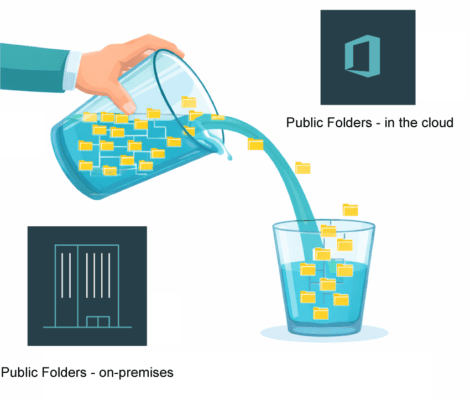
As the old saying goes, “You can’t tip a quart into a pint pot”.
So don’t expect to take your big, heavily nested folder hierarchies directly into PFs online.
You’ll need to review them, clean them up and reorganise them to ensure they fit within the cloud model and perform reliably once they’re moved.
The good news is that Microsoft came up with free PowerShell scripts to help on-prem to cloud Public Folder migrations, however for complex or large-scale environments, you may need a little extra help to ensure your migration is quick, accurate and fully logged.
Customer example: Using free Public Folder migration tools with a bit of help where needed….
We recently helped a leading design consultancy move its public folders into Exchange online.
For this particular project we took an hybrid approach and combined the free ‘native’ Microsoft PF migration tools along with a specialist Public Folder migration tool (in this case, ExchangeSavvy) to cope with the more complex data structures the company had.
This is what the migration roadmap looked like:
Phase 1: Mailbox Migration
Using native Microsoft tools, we built the bridge between the on-premises environment and the cloud:
- AD Cleanup & Identity Sync: We used Microsoft Entra Connect to sync local users to the Microsoft 365 cloud, ensuring they appeared as “Synced from on-premises.”
- Hybrid Configuration: We ran the Hybrid Configuration Wizard to establish Exchange Modern Hybrid connectivity.
- Enable MRS Proxy: We activated the Mailbox Replication Service (MRS) to “pull” the data securely to the cloud.
- Batch Execution: Users were then moved in manageable batches, allowing for a “native” cutover where Outlook reconfigures itself automatically.
Phase 2: Public Folder Migration
To handle the large, complex folder structure, we used ExchangeSavvy to manage the heavy lifting:
- Avoid migration failures before they happen: The tool identified “blockers” like items over 150MB or folders exceeding the 100,000-item limit before they could cause errors.
- Optimise performance from day one: The tool automatically calculated how many “Target Public Folder Mailboxes” were needed in Microsoft 365 to stay within the 100GB quota, preventing performance “hotspots.”
- Minimise disruption to users: We performed an initial bulk copy while users continued working. Incremental “delta syncs” followed this to capture any final changes.
- Deliver a seamless cutover experience: After a brief lockdown window and a final sync, the hierarchy was “switched on” in Microsoft 365. For end users, the folders simply reappeared in their Outlook, fully updated and ready for use.
The Results
In short, by combining the reliability and zero cost of native Microsoft tools with ExchangeSavvy’s automated engine we were able to deliver a relatively low cost, “clean”, compliant, and high-performance migration that met the client’s migration schedules.
The two phase approach also ensured zero business disruption.
To conclude with an even older Northern saying, “There’s nowt such thing as a free lunch,” so don’t expect the free tools from Microsoft to give you everything you need for your migration – you may need to spend a little extra to get the job done right!

“There’s nowt such thing as a free lunch“
Microsoft Migration Services
Book a free chat with one of our Public Folder migration specialists.